The 6 Best Budget Mic Preamps (2026)

An external mic preamp can add controls or a different recording character. These six affordable models compare desktop units and two-channel racks; check your interface connections before choosing.
My top recommendation is the Golden Age Project PRE-73 Jr MKII for transformer-based character, separate gain and output controls, and a compact single-channel setup.
My budget recommendation is the Behringer MIC2200 V2 for two mic/line channels with highpass filters and parametric EQ in a rack unit.
Contents
The Best Budget Mic Preamps (2026)
1. Golden Age Project PRE-73 Jr MKII
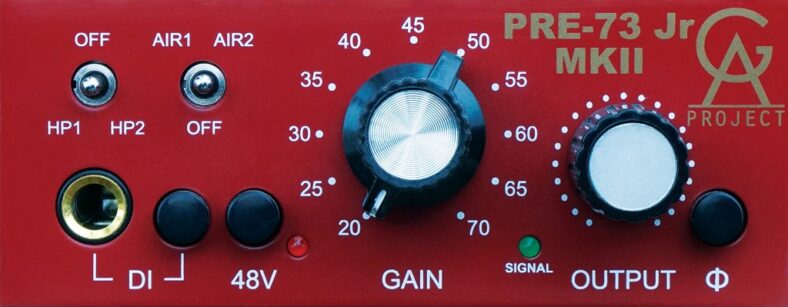
The Golden Age Project PRE-73 Jr MKII is my first recommendation if you want a compact character preamp with separate gain and output controls. Its discrete Class A circuit and transformer-balanced input and output take their inspiration from the preamp section of a classic 1073 module.
Pros
- Transformer-balanced input and output
- Separate gain/output controls, Air boost, and high-pass filtering
Cons
- Simple signal LED provides less detail than a full meter
That separate output adjustment is central to its appeal. You can increase the gain for more coloration, then reduce the output to feed the next device at an appropriate level. Compare those settings at a similar recorded volume: a louder take can seem more impressive even when the tone is less suitable.
The MKII adds a two-position Air boost and selectable high-pass filtering, alongside a front instrument input and an insert connection for external processing. The Air switch provides a broad high-frequency adjustment; it is not a substitute for a full equalizer. Likewise, this is a preamp inspired by a console circuit, not an entire 1073 channel strip.
Choose it for vocals or instruments when committing some tonal character during recording appeals to you. The simple signal LED offers less detail than a full meter, so watch your interface input as well. A clean, neutral recording that you intend to shape entirely with plugins may not need this hardware.

2. Behringer MIC2200 V2
The Behringer MIC2200 V2 is the practical two-channel option if you want mic or line preamplification and some tone adjustment in one rack unit. Each channel has a high-pass filter and a fully parametric single-band EQ, as well as the usual gain and output controls.
Pros
- Two mic/line preamp channels
- High-pass filter and single-band parametric EQ per channel
Cons
- Only one EQ band per channel
A parametric band lets you choose the frequency, bandwidth, and amount of cut or boost. That is more targeted than a fixed tone switch, but it is still only one EQ band per channel. Use it for a particular problem or tonal decision rather than expecting the control of a multi-band mixing equalizer.
The V2 includes a 12AX7 tube, phantom power, polarity reversal, and balanced connections. Those features make it flexible for a small rack, but a visible tube does not establish that it will outperform the preamps already in your interface. The useful question is whether you need its two channels and its analog controls.
Choose MIC2200 V2 for an affordable paired setup or two independent sources. It feeds analog line outputs, so your interface still needs two available line inputs and converters to record both channels. For a stereo microphone pair, match the channel settings carefully; two channels in a box do not make the controls automatically linked.

3. ART Tube MP Studio V3
The ART Tube MP Studio V3 suits a small recording setup that needs a compact mic preamp and instrument DI. Its 12AX7A-based hybrid circuit, input and output adjustments, and selectable voicings give you several ways to shape a source without filling a rack.
Pros
- Compact mic preamp and instrument DI
- Sixteen voicings with Neutral, Warm, and OPL options
Cons
- Only one channel for recording microphones or instruments
V3 means Variable Valve Voicing. The preset selector offers sixteen settings arranged around Neutral, Warm, and OPL options. These combine different tonal curves, saturation choices, and Output Protection Limiting. The suggested source labels are starting points; a setting marked for an instrument is not restricted to that instrument.
Begin with a relatively neutral setting and establish a sensible recording level before comparing the alternatives. A flattering preset on a solo vocal can add too much bass or high-frequency emphasis once the backing track is playing. The VU meter and clip indicator help with adjustment, but your recorder still needs its own headroom.
Choose Studio V3 for its small size and preset-based approach. Check the complete product name: the Original, Studio V3, and USB Project Series have different features. This Studio V3 is an analog preamp, so recording into a computer still requires an audio interface. Follow the power specification for the exact unit supplied.

4. Black Lion Audio Auteur DT
The Black Lion Audio Auteur DT is a good fit if you want one accessible desktop channel with a clear set of controls. It combines an IC-based input stage with a transformer-coupled output, rather than using a tube or a menu of tonal presets.
Pros
- Accessible desktop controls and a VU meter
- Mic input plus a high-impedance instrument input
Cons
- No separate output trim to control the recording level
The panel provides gain, phantom power, polarity reversal, a pad, and a switch for the high-impedance instrument input. That makes it suitable for alternating between a microphone and a direct guitar or bass recording. It is a single-channel device, so those connections do not give you two simultaneous recording channels.
Its VU meter is useful for watching the signal, while the rear quarter-inch TRS output connects to an appropriate line input on an interface or mixer. Include that cable in your plan: the output is not an XLR socket, and there is no USB connection to a computer.
Choose Auteur DT when convenient desktop operation matters more than a separate output attenuator or onboard EQ. It offers up to 60dB of gain, but the suitability of that range depends on microphone sensitivity and source level. Do not assume the gain specification alone guarantees a quiet recording from every low-output ribbon or distant voice.
5. Warm Audio WA12 MKII
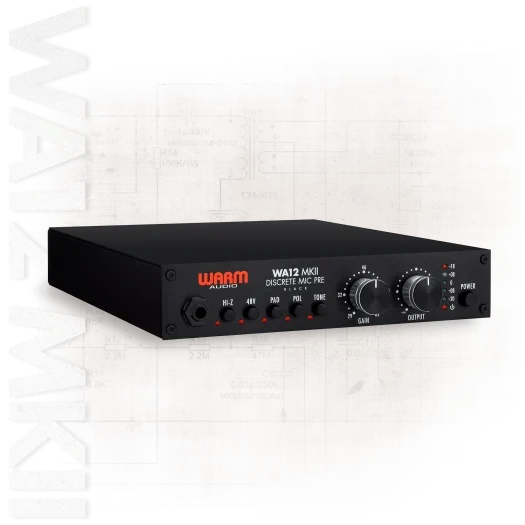
The Warm Audio WA12 MKII is the step-up choice here for someone who specifically wants a discrete, transformer-based preamp. The current black model uses CineMag input and output transformers and provides separate gain and output attenuation controls.
Pros
- CineMag input and output transformers
- Separate gain and post-transformer output attenuation
Cons
- Pricey for a single-channel preamp
The output attenuator follows the output transformer. That lets you explore more drive through the preamp while reducing the level sent to your interface. It is useful for deliberate coloration, provided you listen to the recorded result and keep the converter from clipping. Increasing drive is a creative choice rather than an automatic improvement.
A front high-impedance input accommodates direct guitar and bass recording. Phantom power, a pad, polarity reversal, and the Tone switch provide further adjustment. The Tone function changes the input loading, so its effect depends on the connected microphone or instrument; it is not a conventional bass-and-treble EQ.
Choose WA12 MKII when this gain-and-output workflow is the reason for buying an external preamp. It is a larger commitment than a basic gain box, and still only provides one channel. Check that the listing and picture show the current black WA12 MKII rather than the legacy orange version or a 500-series module requiring a separate chassis.

6. ART Pro MPA III
The ART Pro MPA III is worth considering when you need two channels and want more adjustment than a compact desktop preamp provides. Its Voice switch selects Tube or Solid State operation, while a separate Character setting offers an Enhance mode aimed at vocal intelligibility.
Pros
- Two channels with Tube and Solid State voicings
- Variable impedance, low-cut filtering, and instrument DI
Cons
- Takes up two rack spaces
Variable input impedance gives another way to explore a microphone’s response, alongside low-cut filtering, phantom power, polarity reversal, and additional gain. Change one control at a time and compare at similar output levels. A useful setting for one microphone may not be the best match for another.
Instrument DI connectivity and backlit VU meters make it suitable for a small studio rack handling varied sources. Its selectable operating level also deserves attention when connecting to other equipment: choose the setting that matches the receiving line input, then check the recorded level rather than relying on the analog meter alone.
Make sure you are comparing the Pro MPA III. The older Pro MPA II has a different feature set, so an older review is not a reliable explanation of the III’s Voice and Character controls. Choose the III for its two-channel flexibility and selectable voicings; a single desktop preamp is easier to accommodate if you record one source at a time.
How to Choose a Budget Mic Preamp
Start with the Problem You Need to Solve
If your interface already records a microphone cleanly at the required level, another preamp may bring a different sound or workflow rather than a clear technical improvement. Microphone placement, room reflections, and the source often deserve attention first. Hardware cannot remove the room sound that reached the microphone.
For a low-output mic, consider the source level and available gain as well as noise performance. An inline booster can help in some dynamic or ribbon microphone setups, but it still needs a receiving preamp. It is a different purchase from the full preamps in this list.
Check the Complete Signal Path
The usual connection is microphone to external preamp, then preamp line output to an interface line input. Select line mode where available and follow the interface manual for the connection that bypasses or minimizes its microphone gain stage. An XLR socket is not automatically the correct destination for a line-level output.
Check the output connector, balanced or unbalanced wiring, and the receiving input’s level capability. An external preamp does not add another analog-to-digital converter. Two preamp outputs still require two suitable recording inputs if you want to capture them simultaneously.
Separate Gain and Output Controls
Separate controls help you change how hard the preamp is driven while keeping the next device at a manageable level. PRE-73 Jr MKII and WA12 MKII are useful examples. Start conservatively, record a short loud passage, and inspect the result before committing a full performance.
Lowering the recording fader in software cannot repair clipping that already happened in the preamp or converter. Leave room for louder phrases. Compare tonal changes at similar playback levels, particularly when deciding whether extra drive helps a vocal or simply makes it louder.
Buy the Channels and Controls You Will Use
One channel is enough for overdubbing a vocal, guitar, or bass. Two channels are useful for a stereo source or two performers, provided the rest of the recording system has matching capacity. Budget for the required cables and rack or desktop space as well as the box itself.
A filter, polarity switch, pad, or instrument input may save more time than an impressive list of tonal claims. EQ applied before recording is committed to the take, so make only adjustments you are comfortable keeping. More elaborate vocal processing can be handled later; see our guide on how to mix vocals for the broader workflow.
Frequently Asked Questions
Does a Tube Preamp Always Sound Better?
No. A tube is one component within a complete circuit, and different designs use it differently. Some settings aim for a fairly clean result; others add obvious coloration. Choose the controls and response that suit the recording instead of assuming the presence of a tube guarantees better sound.
Can I Connect These Preamps Directly to USB?
No. The specific models listed here provide analog audio outputs. Use an audio interface or recorder with suitable inputs to capture them digitally. Some similarly named product families contain USB versions, so check the exact model rather than assuming a connection is included.
Should Phantom Power Come from the Preamp or Interface?
For a condenser microphone connected to an external preamp, the preamp normally supplies the required phantom power. Follow the microphone and preamp instructions, and keep phantom power off on a receiving line connection unless the equipment documentation specifically requires it. Check ribbon and other specialist microphone requirements individually.
Will a New Preamp Remove Hiss or Background Noise?
Only if the relevant problem comes from the original gain stage and the replacement performs better in that setup. It cannot remove traffic, computer fans, or room reflections captured by the microphone. Check mic distance, source level, cables, and gain settings before deciding which piece of equipment is responsible.
Which Is the Best Budget Preamp for Vocals?
PRE-73 Jr MKII is a useful starting point for intentional transformer-based character, while Auteur DT suits a simpler desktop setup. Studio V3 provides selectable voicings in a small box. Choose according to the microphone, required gain, and controls you want to commit before recording rather than expecting one universal vocal sound.
Summary
Choose PRE-73 Jr MKII for compact character and independent output control, Studio V3 for selectable voicings, or Auteur DT for a straightforward desktop channel. MIC2200 V2 offers two channels with EQ, WA12 MKII provides a step-up transformer design, and Pro MPA III adds two-channel flexibility with tube and solid-state voicings. Check the line-input connection before buying.