The 6 Best Equalizer Plugins of 2026 (Free and Paid)
An equalizer should make it easy to hear and control the change you need. These six plugins cover everyday mixing, dynamic correction and broad tonal shaping, with a free option for simpler adjustments.
My top pick is FabFilter Pro-Q 4 for its static, dynamic and spectral processing, clear frequency display and detailed control over individual bands.
My budget pick is TDR VOS SlickEQ, a free equalizer with three main bands, four EQ models and automatic gain compensation for broad tonal changes.
Contents
The Best Equalizer Plugins (2026)

1. FabFilter Pro-Q 4
FabFilter Pro-Q 4 is my first recommendation if you want one EQ for most mixing jobs. Its large frequency display makes it straightforward to place a filter, adjust its width, and see how several changes combine. That is useful on individual tracks as well as buses.
Pros
- Static, dynamic and spectral processing
- Per-band mid/side controls and three phase modes
Cons
- Linear Phase mode adds processing latency.
You can use ordinary static bands, dynamic EQ, or spectral dynamics. A static cut remains in place throughout the performance; a dynamic band reacts to its detector. Spectral dynamics can act on individual problem frequencies within a band instead of moving the entire band together. Start with the simplest treatment that solves the issue.
The per-band mid/side controls and choice of Zero Latency, Natural Phase, and Linear Phase modes also make Pro-Q 4 useful beyond basic channel EQ. Choose the processing mode for the session rather than assuming linear phase is always preferable.
The main reason to buy it is the combination of a clear workflow and detailed control. You do not need to use all 24 bands. If you mainly want broad tonal changes with a few knobs, SlickEQ is a more focused place to begin; if you want automatically suggested cross-track balancing, consider smart:EQ 4.
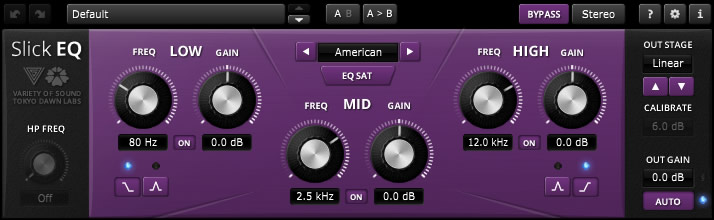
TDR VOS SlickEQ is my free recommendation for shaping the overall tone of a recording. Its low, mid, and high sections keep attention on a small number of decisions, with an additional high-pass filter for reducing unwanted low-frequency content.
Pros
- Free broad tone-shaping EQ
- Four models and selectable output-stage coloration
Cons
- No dynamic EQ bands for controlling occasional frequency spikes.
Four EQ models offer different curve behavior. The output stage can remain linear or use several saturation choices, so you can compare a clean correction with a subtly colored version. These controls are intended for tonal texture, not for replacing a dedicated distortion effect.
Auto-gain helps compensate for changes in perceived loudness as you adjust the EQ. That makes it easier to judge whether a brighter sound is actually clearer or simply louder. Start with one broad change, then bypass the processor while the whole mix plays.
This is the free SlickEQ, not SlickEQ GE or SlickEQ Mastering. It is a useful complement to a DAW’s detailed parametric EQ, especially when too many movable bands slow you down. Choose Nova or Pro-Q for dynamic problem solving; SlickEQ is the simpler choice when you want a stable overall tonal adjustment.
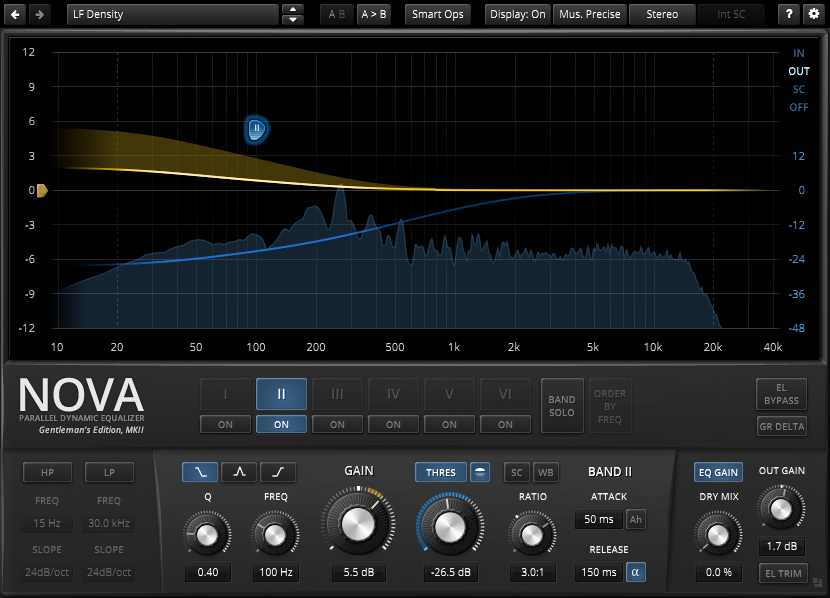
TDR Nova GE is the paid equalizer to consider when the problem changes with the performance. Its six dynamic EQ bands can reduce or increase selected frequency regions according to level, making it useful for an occasionally harsh vocal or a bass part with uneven resonance.
Pros
- Six dynamic EQ bands
- Expanded dynamics and Smart Operations
Cons
- Surgical mode uses more processing power.
The dynamics options extend beyond downward compression to expansion and upward processing. That flexibility is useful if you understand the behavior you need. For a beginner, a single band with modest gain reduction is a better starting point than treating every visible peak as a fault.
Smart Operations include spectral matching and resonance-removal tools, while equal-loudness functions help you compare settings without letting extra level dominate the decision. Use the automatic tools as proposals and check their effect in the mix, especially when the source has intentional brightness or distortion.
GE is a different purchase from the free TDR Nova. Try the free edition first if four dynamic bands cover your work; choose GE for its additional bands and expanded processing. Nova GE suits frequency-selective control more directly than a broad tone-shaping EQ such as MP-EQ.

Pulsar MP-EQ is the choice here for broad tonal shaping with a passive-EQ approach. It is the current name for Pulsar Massive, so existing owners should check their update entitlement before buying another license.
Pros
- Broad curves with adjustable analog-style coloration
- Mid/side processing and auto-gain
Cons
- Requires an iLok account and iLok License Manager.
Its parallel EQ topology means the bands interact differently from a conventional series of digital filters. A graph shows the combined curve, which is useful when the knob positions do not tell the whole story. This is a tool for shaping the overall balance of a voice, instrument, or mix bus.
Drive changes the modeled nonlinear behavior, and transformer choices give you further control over the output character. Keep the output level comparable when experimenting: a stronger low end and a louder signal are separate changes. Auto-gain provides a starting point for that comparison, but still listen to the result.
Mid/side processing and optional linear-phase correction extend its use beyond the hardware-style controls. Choose MP-EQ when you want broad curves and coloration in the same processor. Pro-Q 4 or Nova GE is a more direct first choice for a narrow resonance that needs to respond only when it becomes excessive.
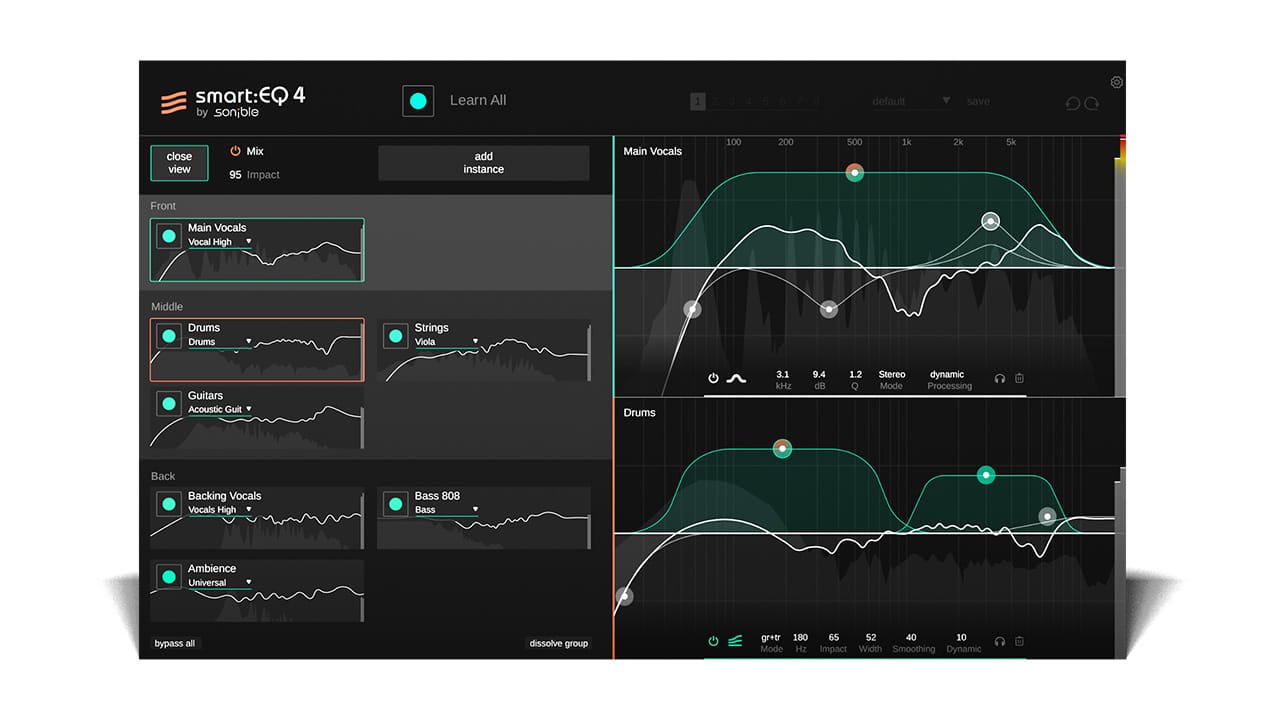
sonible smart:EQ 4 is worth considering when several tracks sound reasonable alone but compete in the arrangement. It combines an analyzed smart:filter with manual EQ controls and cross-channel grouping, so you can work on the relationship between sounds.
Pros
- Cross-channel grouping for up to ten tracks
- Manual EQ controls alongside assisted processing
Cons
- Automatic balancing can reduce tonal features you want to keep.
Groups can contain up to ten tracks, with a hierarchy that tells the processor which elements should take priority. For example, a lead vocal may need more prominence than a supporting keyboard. The grouping tools give that decision a practical control rather than assuming every track should occupy equal space.
Track, Group, and Track and Group modes separate individual tonal balancing from unmasking between group members. Instrument, vocal, and mix profiles provide starting targets, and you can create a profile from a reference. The manual bands also support dynamic behavior.
Choose it for an assisted workflow you intend to supervise. A profile cannot know which strange tone is the defining feature of your song. Reduce the processing amount, narrow its frequency range, or bypass it when the proposed balance removes something intentional. A conventional EQ is simpler when you already know the exact adjustment you want.

DMG Audio EQuilibrium is a specialist option for engineers who want extensive control over filter behavior and the interface itself. It has 32 bands, several families of curves, and a reconfigurable layout, with routing and metering options suited to detailed mixing and mastering work.
Pros
- 32 bands and extensive filter choices
- Configurable layout, routing and metering
Cons
- More elaborate processing settings can increase CPU use.
The curve choices include digital filters, circuit-inspired models, and engineering filter types. Its phase options let you explore different processing approaches instead of treating every bell or shelf as interchangeable. That depth is useful when you can hear a difference and want to investigate the cause.
Stereo processing can address the full image, mid, side, left, or right signals. Multiple analyzer modes help inspect the material, while A/B banks make it easier to compare alternate treatments. Keep a modest display range for subtle work so the graph does not encourage larger moves than the music needs.
EQuilibrium makes sense when this degree of configuration is part of your working method. It is more elaborate than a first EQ needs to be, and processing choices can affect CPU demand. Try the demo in a real session. For quick corrective mixing with less configuration, Pro-Q 4 is the more direct recommendation.
How to Choose an Equalizer Plugin
Start with the problem, not the graph
An EQ changes the level of selected frequencies. Before adding a band, identify what needs to change: a boxy vocal, a bass note that overwhelms the room, or a cymbal that becomes harsh when struck hard. A spectrum analyzer can help locate an issue, but every visible peak is not something to remove.
Listen in context. A guitar that sounds thin alone may be exactly right beside bass and keyboards. Recheck your EQ after moving a fader or changing the arrangement, because the frequency balance between instruments may already have improved.
Choose static or dynamic processing deliberately
A static EQ applies its curve continuously. It suits a stable tonal imbalance, such as a recording that consistently has too much low midrange. A dynamic EQ changes its action according to level, allowing you to control a region when it becomes excessive while leaving quieter passages less affected.
If the whole signal is uneven, a compressor may be the more direct tool. If only one frequency region jumps out, dynamic EQ can be more selective. Neither approach removes the need to improve microphone placement or edit a recording with large level changes.
Treat phase modes as practical choices
Linear-phase processing is useful in some situations, but it can add latency and pre-ringing. Minimum-phase and related conventional approaches have different phase behavior. Use a low-latency mode while recording when monitoring response matters, then compare alternatives during mixing if there is a reason.
For stereo work, mid/side processing can change the center and sides independently. It is easy to disturb the image with unnecessary changes, so check the result in mono and keep the original available for comparison.
Check the host and the license
Confirm your operating system, processor support, and plugin format before buying. Logic uses Audio Units, while Pro Tools uses AAX; other hosts commonly support VST3. A product being available for Mac and Windows does not mean every release supports every processor or older DAW.
Install the demo in a representative session and try opening it again after saving. Include any license manager in that check. Your DAW’s stock EQ may already cover ordinary filters, so a paid choice should add a workflow or sound you will use.
Frequently Asked Questions
What is the best free EQ plugin?
TDR VOS SlickEQ is a useful free choice for broad tone shaping. The separate free TDR Nova is more appropriate when you need dynamic bands. Start with the kind of processing you need rather than assuming one free EQ should replace every other tool.
Can an EQ plugin fix a poor recording?
EQ can improve tonal balance, but it cannot reliably separate a voice from a competing sound recorded into the same microphone. Heavy filtering may remove useful detail along with the problem. Fix obvious recording issues first, then use smaller EQ moves on the improved source.
Should I boost or cut with EQ?
Both are valid. A cut can reduce an unwanted resonance, while a boost can bring out a useful part of the sound. Keep enough output headroom after boosting and compare at similar loudness. The size, width, and position of the change matter more than a blanket rule against boosting.
Do I need a separate mastering EQ?
You can master with a flexible mixing EQ if its controls and processing modes suit the material. EQuilibrium and MP-EQ provide different approaches to detailed or broad work, but buying a specialist processor does not establish that a mix needs more EQ. Compare small changes and preserve the balance that already works.
Summary
Choose Pro-Q 4 for a flexible main EQ, Nova GE for frequency-selective dynamics, or MP-EQ for broad analog-style shaping. smart:EQ 4 adds supervised cross-track balancing, EQuilibrium goes deeper into filter configuration, and free SlickEQ keeps everyday tonal decisions simple. Buy the tool that improves a task you do regularly.