The 6 Best Sampler Plugins for Chopping and Sound Design of 2026
Sampler plugins cover different jobs, from chopping a recording into playable slices to building mapped instruments. These six compare focused sampling workflows with broader sound-design tools.
My top recommendation is Serato Sample for turning recordings into playable parts, with up to 32 slices, stem separation, and tempo and key tools.
My budget recommendation is TX16Wx Professional for detailed sample mapping, time stretching, and pitch shifting; check which licence covers your intended use before buying.
Contents
The Best Sampler Plugins for Chopping and Sound Design (2026)
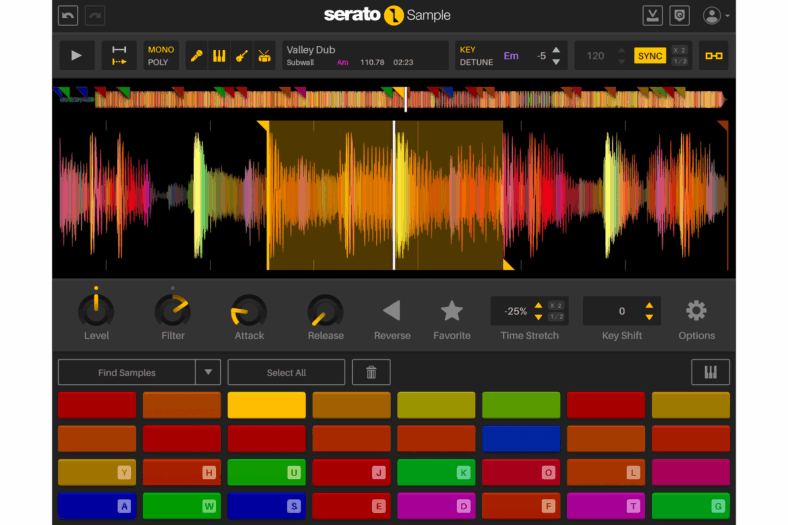
Serato Sample is the focused choice for taking a recording, finding useful sections, and playing them as a new musical part. Its cue-point workflow maps up to 32 slices to pads that you can trigger from MIDI notes.
Pros
- Up to 32 slices with per-pad controls
- Stem separation plus tempo and key tools
Cons
- Limited to 32 slices per loaded sample
Tempo and key tools help you place the source in a new project, while per-pad controls let you change individual chops. That is useful when a phrase works rhythmically but a small section needs a different start point, pitch, or playback behavior. Keyboard Mode provides another direction by spreading a chosen sample across notes.
Stem separation can isolate vocals, melodies, bass, and drums from a mixed source. Treat the result as material to evaluate: separation quality depends on the recording, and isolated parts may contain artifacts. Listen in context before assuming that a separated stem will sound like an original studio track.
Choose Serato for a fast beat-making workflow rather than detailed construction of an orchestral instrument with many articulations. It is an especially useful comparison when your current sampler handles basic playback but makes discovering and rearranging chops slow. Try the same source loop in both applications and compare how quickly you reach a playable result.

TX16Wx Professional is worth considering if you want detailed sample mapping and flexible routing without choosing a large commercial library ecosystem. Its mapping editor organizes groups and regions, allowing a custom instrument to grow beyond a single recording on a keyboard.
Pros
- Detailed mapping with groups, regions, and trigger options
- Professional edition adds time stretching and pitch shifting
Cons
- Recording from the DAW depends on host routing support
Its sample matrix and trigger options are useful for deciding which recording plays in response to a note or controller. That can help build variations into an instrument rather than repeating the exact same sample every time. Wave editing and slicing tools provide further control over the source material.
The paid Professional edition adds capabilities including time stretching and pitch shifting. A free version is also available, and both use the same installer. Compare the edition list with your intended project so you know which functions you are buying rather than assuming every feature mentioned on the site belongs to the free edition.
This is a good fit for users who enjoy constructing instruments from their own recordings. It is less immediate than a dedicated loop-chopping interface. Some recording and routing functions also depend on what the host exposes to the plugin, so test the workflow in your DAW. Downloading a capable sampler does not guarantee that every host offers the same input and output arrangements.

3. Native Instruments Kontakt 8
Kontakt 8 is the practical purchase when you want both instrument-building tools and access to libraries that require full Kontakt. It is also a host for many commercial sampled instruments, but the library compatibility question should come before the purchase.
Pros
- Detailed sample mapping and instrument-building tools
- Runs libraries that specifically require full Kontakt
Cons
- Third-party libraries can add to the cost
Kontakt Player is free and runs supported licensed instruments. Full Kontakt provides the deeper creation tools and runs libraries that specifically require it. Buying the full version is unnecessary simply to use a Player-compatible piano; it becomes useful when you need unrestricted editing or a particular full-Kontakt library.
For your own instrument, mapping recordings across notes and velocities is the central job. That can range from a small collection of struck objects to a more detailed keyboard instrument. Kontakt also includes Leap for manipulating loops, so it has a faster creative route alongside its traditional instrument structure.
The compromise is complexity and ecosystem management. Samples, instruments, extra libraries, and player versions must remain organized. A new sampler purchase does not include every third-party Kontakt library, and an attractive instrument screenshot does not guarantee that its full sound set is bundled. Choose Kontakt for the specific editing or library requirement; choose Serato if straightforward audio chopping is the main task.
Falcon is for producers who want a sample to become one component of a more elaborate sound. It combines sampling oscillators with synthesis, effects, modulation, and a structured instrument-building environment.
Pros
- Combines sampling with synthesis and modulation
- Programs, layers, and keygroups support detailed sound design
Cons
- Steep learning curve for building instruments
You can begin with an ordinary recording, then layer it with a synthetic source or process it through a different playback method. Granular techniques are useful for drawing texture from a short sound, while conventional sample playback remains available when you need recognizable attacks and natural note shapes.
The hierarchy of programs, layers, and keygroups gives you detailed control over how the instrument is assembled. That structure can be valuable when several sources need different filters, envelopes, or effects. It also means learning where a modulation assignment lives, rather than expecting every change to apply globally.
The current Falcon edition is 2027; its broad engine is the reason it appears here, rather than an assumption that a newer name makes it right for everyone. Check the included library and distinguish Falcon from a soundware-only expansion or a bundle. UVI uses iLok licensing. Choose it when you want sustained sound-design work and can spend time learning the structure. For a few quick chops on a drum loop, Serato’s narrower workflow is easier to justify.
5. Steinberg HALion 7
HALion is a good option for musicians who want to build detailed instruments and combine sampling with other sound-generation methods. Its environment goes beyond playing an existing library, with tools for sample mapping, instrument structure, and modulation.
Pros
- Sample mapping and detailed instrument construction
- Sample-based, granular, FM, and spectral approaches
Cons
- Complex interface for basic sample chopping
HALion 7 includes sample-based, granular, FM, and spectral approaches. A recording can therefore become a conventional mapped instrument or the starting material for a more transformed sound. This is useful when you want to compare several ways of using the same source without changing to an entirely separate instrument.
For a straightforward multisample project, begin with clean recordings and sensible note ranges. Establish consistent levels and playable transitions before adding complex modulation. Detailed tools are most useful once the underlying mapping behaves reliably; they cannot replace a coherent set of source recordings.
Check the edition carefully. HALion and HALion Sonic are related products with different creation capabilities, and a crossgrade or upgrade license may require qualifying ownership. The full HALion product is the comparison here. It is a substantial environment to learn, so it suits someone who expects to build and revise instruments regularly. If you primarily want to trigger a small set of one-shots, a simpler sampler may be a better use of your time.
TAL-Sampler is the choice here for making sample-based synth patches with vintage digital coloration. Its resampling modes model aspects of older sampler playback, giving you more to work with than putting a bitcrusher after a clean sample player.
Pros
- Four sample layers with mapping and modulation
- Resampling and DAC modes for vintage digital character
Cons
- Only four layers for building more elaborate sample patches
The instrument has four sample layers, a mapping editor, filters, envelopes, LFOs, and a modulation matrix. That is enough to turn a short recording into a playable patch with its own response. Variable sample rate and the DAC modes let the playback character become part of the sound-design decision.
Try it with a brief vocal tone, a struck object, or a simple synth note. Establish a loop or one-shot shape, map the playable range, then compare clean playback with the more colored modes. Adjust the filter afterward so you can hear which part of the change comes from the resampling.
TAL-Sampler is less suitable if your main goal is hosting large third-party instrument libraries or building an extensive articulation system. Its appeal is a relatively focused instrument with character controls and quick use of your own audio. The downloadable demo has audible restrictions, so it is a way to assess the workflow, not a free production license. Check the current compatibility requirements before installing.
How to Choose a Sampler Plugin
Choose Between Chopping and Instrument Building
A chopping sampler divides audio into sections that you trigger in a different order. An instrument-building sampler maps recordings across a keyboard, velocity ranges, or other conditions. Both use samples, but they lead you through different jobs. Decide which workflow occupies most of your sessions before comparing feature counts.
For rearranging a loop, start with Serato. For a recorded instrument with many notes and dynamics, compare Kontakt, HALion, and TX16Wx. Falcon suits projects where sampling and synthesis will overlap, while TAL emphasizes a compact sample-based patch with vintage playback character.
Test the Sampler Already in Your DAW
Import a source file, set its start and end points, map or slice it, and save the result. Check whether the built-in tool already handles your usual work comfortably. A paid alternative is useful when it makes a repeated task easier or supplies a function you actually need.
Use the same audio and MIDI part in a demo to compare fairly. Listen for clicks at loop points, tempo changes, note transitions, and what happens at different velocities. Also time the practical job of finding a sample and turning it into an instrument. The most elaborate engine is not always the fastest tool for a session.
Separate the Engine From the Library
A sampler engine, a bundled factory library, and a third-party instrument are distinct purchases. Check what is included and what additional libraries require. Kontakt Player compatibility, for example, is a specific statement about an instrument; it does not imply that all Kontakt libraries are unlocked by the free player.
Check whether an offer is a full license, an upgrade, a crossgrade, or an expansion. A low-cost expansion can look like the main instrument in search results but still need a separately owned host. Buy from the exact product page, with the qualifying requirements understood.
Keep Sample Files With the Project
A saved preset may reference audio stored elsewhere on the computer. Use the sampler’s collection or export facilities where available and check how it handles external files. Reopen a copied project before assuming the sample instrument is portable. Keep a separate backup of recordings you cannot recreate.
For release work, start with recordings and samples you are entitled to use. A sampler’s ability to isolate or transform a sound does not itself grant permission to use the source. This is another reason a clear personal sample library can make production simpler.
Frequently Asked Questions
What Is the Best Sampler Plugin for Beginners?
Begin with the sampler in your DAW. If chopping is the missing workflow, try Serato Sample. TAL-Sampler is worth comparing for playable sample-based patches. Kontakt, HALion, and Falcon have more depth, but a beginner does not need to learn all their capabilities to use a basic instrument.
Can a Sampler Turn Any Recording Into a Playable Instrument?
It can map a recording to MIDI notes, but the result depends on the source and playback method. Pitching one recording across several octaves changes its character. More recordings, careful loops, velocity layers, and appropriate processing can improve the result when you need a convincing instrument.
Do I Need a Pad Controller?
No. A keyboard, DAW piano roll, or other MIDI input can trigger samples. A pad controller can make chopping and rhythm performance more comfortable, but choose it after establishing the sampler workflow. Our MIDI keyboard guide covers another way to play sampled instruments.
Is Kontakt Player the Same as Kontakt?
No. Player runs compatible instruments with a reduced creation environment. Full Kontakt includes the deeper building tools and supports libraries that require it. Read the exact library requirements before paying for the full sampler.
Conclusion
Choose Serato for chopping, Kontakt for its instruments and deeper creation tools, and Falcon for hybrid sound design. HALion offers a broad building environment, TAL supplies vintage sampler character, and TX16Wx Professional suits detailed mapping. Match the purchase to the task your existing sampler does not handle comfortably.