The 6 Best Hardware Synthesizers (2026)

A hardware synthesizer should fit the sounds you want to make and the way you like to work. These six keyboards cover hybrid sound design, analog bass and leads, expressive digital synthesis and polyphonic playing.
My top pick is the Arturia MiniFreak for its two digital sound engines, analog filters and hands-on modulation, sequencing and effects in a compact keyboard.
My budget pick is the Novation Bass Station II for affordable analog bass and lead sounds, with full-size aftertouch keys, a sequencer and an arpeggiator.
Contents
The Best Hardware Synthesizers (2026)
1. Arturia MiniFreak
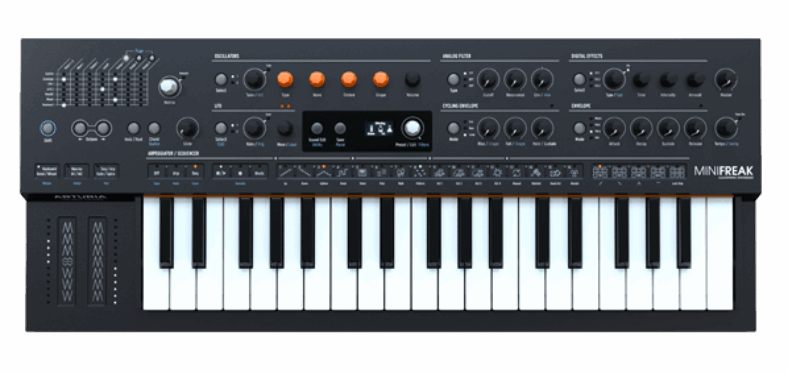
The MiniFreak is a useful first serious synth if you want to explore several kinds of synthesis without assembling a collection of instruments. Its two digital sound engines feed analog filters, and the engine choices go well beyond ordinary saw and square waves.
Pros
- Two digital engines feeding analog filters
- Modulation matrix, sequencer and arpeggiator
Cons
- Slim keys can feel cramped for players used to full-size keys.
You can make a straightforward bass or pad, then experiment with a more unusual oscillator or use the second engine to process the first. The modulation matrix provides routes between control sources and sound parameters. That makes it possible to add movement gradually, rather than rely entirely on a preset’s built-in effects.
The six-voice architecture is suitable for chords and many layered arrangements, while the sequencer and arpeggiator help with repeating patterns. Arturia also supplies MiniFreak V to registered hardware owners, which is useful if you want to continue working with compatible sounds in your DAW.
The main compromise is the compact 37-note Slim-key keyboard. A pianist should try the key size before buying, and six voices can run out with sustained chords and long releases. Choose it for a small studio or a second keyboard focused on sound creation. A player who wants more conventional analog controls and fewer engine choices may prefer the minilogue xd.

2. Novation Bass Station II
Bass Station II is the focused choice for synth bass and lead lines. Its two analog oscillators, additional sub-oscillator, and choice of Classic and Acid filters provide a straightforward route to shaping a single prominent part.
Pros
- Focused analog bass and lead controls
- Paraphonic and AFX modes expand sound design
Cons
- Cannot play full chords with an independent voice for each note.
The 25 full-size keys and aftertouch are practical for a compact second keyboard. Dedicated controls for the filter, envelopes, and modulation make it suitable for adjusting a bass while a pattern plays. The sequencer and arpeggiator let you work on repeated phrases without continually replaying them.
Current firmware adds more possibilities than its original monophonic description suggests. Paraphonic mode lets the two main oscillators play separate pitches, and AFX Mode can assign different sound settings to different keys. Those are useful creative features, but they do not turn it into a conventional polyphonic synth with a complete independent voice for every chord note.
Buy it when you have a clear bass or lead role to fill. If this will be your only keyboard and you want to play complete two-handed chord arrangements, start elsewhere in this list. Also decide how you will add space effects: its drive and distortion serve a different purpose from a lush stereo reverb. A DAW or external effects unit can provide that part of the chain.

3. Korg minilogue xd
The minilogue xd is the choice here for learning a recognizable analog synth signal path while retaining some digital expansion. Each voice combines two analog oscillators with Korg’s digital multi-engine, followed by the filter and amplifier stages.
Pros
- Analog oscillators plus a digital multi-engine
- Motion sequencing and user oscillator support
Cons
- Four voices limit sustained chord overlap
The layout encourages a direct approach: choose waveforms, balance the oscillators, shape the filter, and adjust the envelopes. The oscilloscope gives you visual feedback as you change the sound. It is a useful companion to listening, especially when you are learning what waveform shaping or modulation does.
The 16-step sequencer can record notes and motion for up to four parameters. A short pattern can therefore evolve through changes in cutoff or other settings without needing automation from a computer. The digital effects and user oscillator support give the xd more range than its traditional appearance suggests.
Its four voices are the purchase limitation to take seriously. A four-note chord uses them all, leaving no spare voice for the next chord’s overlap. It suits basses, compact chord voicings, sequences, and overdubbed studio work. If you regularly play dense chords with long release tails, compare the higher-polyphony digital options before choosing the Korg. Also check that you are buying the keyboard version, rather than the separate xd module.

4. ASM Hydrasynth Explorer
The Hydrasynth Explorer is particularly appealing for expressive pads and digital sound design. Its 37 mid-sized keys support polyphonic aftertouch, allowing pressure on one held note to change that note independently when the patch is programmed accordingly.
Pros
- Polyphonic aftertouch on the keyboard
- Detailed digital synthesis and battery operation
Cons
- Many controls change function between editing pages.
That is useful when a chord needs an emphasized upper voice or a single note needs to grow brighter while the others stay still. It offers a different kind of control from moving one cutoff knob across the whole chord. You will still need to assign a suitable destination and adjust the pressure response to make it comfortable.
The engine includes three oscillators, waveform morphing, Mutant processing, and two filters that can work in series or parallel. Its modulation options are extensive enough for sounds that change over a long held note. Battery operation is another advantage when you want to move the instrument away from the main studio desk.
The tradeoff is editing depth. Several controls change function according to the selected section, so learning the module buttons and display pages is part of owning it. Choose the Explorer if expressive programming interests you. Choose the GAIA 2 or minilogue xd if having more of the basic signal path visible at once matters more than polyphonic pressure control.

5. Sequential Take 5
The Take 5 is for players who want an analog polysynth with full-size keys and a relatively compact footprint. Its five voices use analog oscillators and a filter design drawn from the Prophet-5 family, with digital effects available afterward.
Pros
- Full-size Fatar keys with an analog five-voice engine
- Direct panel controls and Low Split
Cons
- Five voices can run out during sustained chords
The 44-note Fatar keyboard gives you a more conventional playing surface than the slim and mid-sized keyboards above. Low Split can shift the lower part of the keyboard down by octaves, helping you spread a bass note and upper chord across the available keys. It is a range-management feature, not a second independent synth sound.
The front panel gives direct access to the main oscillator, filter, envelope, and performance controls. Modulation routing adds more depth when you want it, and the sequencer and arpeggiator provide patterns for studio or live work. This is a sensible upgrade when the appeal is a specific analog instrument that you will learn thoroughly.
Five voices remain a real restriction for sustained playing. Compare your usual chord voicings with the instrument’s behavior before buying, particularly if you rely on long releases. Take 5 also occupies a different role from a workstation: acoustic piano, drum accompaniment, and a complete multitimbral arrangement are not the reason to choose it. Its strength is the synth part itself.

6. Roland GAIA 2
GAIA 2 is a good fit for players who want wavetable and virtual analog sounds with a visible, performance-oriented control surface. Its main engine combines one wavetable oscillator with two virtual analog oscillators.
Pros
- Wavetable and virtual analog engines
- Full-size keys and USB audio/MIDI
Cons
- Keyboard has no aftertouch
You can build familiar synth tones, introduce a moving wavetable layer, and then use the Motional Pad to control several parameters through an X/Y gesture. Recording that movement can make a sustained patch change without needing to move multiple knobs at once. The sequencer also records performance and panel changes.
Its 37 full-size keys will appeal to players who find compact keys uncomfortable. Class-compliant USB audio and MIDI provide a useful connection to a computer or compatible mobile setup. The built-in SH-101 Model Expansion gives another synthesis approach, while additional Model Expansions are separate purchases.
The keyboard does not have aftertouch, which is a meaningful disadvantage beside the Hydrasynth Explorer if pressure expression is central to your playing. Use the modulation wheel, pad, or external control instead. GAIA 2 also uses digital virtual analog synthesis; do not buy it expecting analog oscillators simply because the panel resembles a traditional subtractive synth. Choose it for the accessible controls, digital range, and performance integration.
How to Choose a Hardware Synthesizer
Decide Whether You Need Chords
Polyphony is the number of voices available at once. A bass line may need only one, while held chords need several. Release tails can continue using voices after you lift your fingers. Play the transition between two chords during a shop demonstration, rather than count how many fingers you can put down on a single chord.
Bass Station II is the specialist bass choice in this list. The minilogue xd, Take 5, and MiniFreak offer progressively different compromises between voice count, keyboard, and synthesis. More voices do not automatically mean a better instrument, but too few for your arrangement can become frustrating quickly.
Analog, Digital, or Hybrid?
Analog oscillators and filters are one route to a synth sound. Digital engines can provide wavetable movement, complex modulation, and other approaches that would be difficult to reproduce with a simple analog circuit. Hybrid instruments combine elements of both. Choose according to the tones and controls you need, rather than assuming the label determines musical quality.
The minilogue xd combines analog oscillators with a digital multi-engine, while MiniFreak uses digital engines into analog filtering. GAIA 2 and Hydrasynth offer broader digital approaches. For a dedicated analog bass part, the simpler Bass Station II may be more useful than either.
Try the Controls and Keyboard
Sound design is easier to learn when you enjoy changing the instrument. Try making a basic patch from an initialized sound: adjust the oscillator, filter, envelope, and modulation, then save it. This reveals more about the workflow than scrolling through the most dramatic factory presets.
Check key size, aftertouch, octave switching, and how quickly you can reach sounds in a performance. A small keyboard can save desk space, but it may require an external controller for your usual parts. Our MIDI keyboard guide covers controllers if that is the arrangement you prefer.
Plan the Connections
USB MIDI carries performance information; it does not always carry audio. Check the actual instrument’s connections and decide how you will record its output. You may need audio inputs on an interface, suitable cables, and a way to monitor the sound. USB audio on GAIA 2 is a specific feature, not something to assume every keyboard synth includes.
Frequently Asked Questions
Which Synthesizer Is Best for Beginners?
The minilogue xd is a good starting point for a visible analog-style signal path. MiniFreak is more suitable if varied digital engines and experimentation are the attraction. Choose Bass Station II when you specifically want bass and leads. Begin with the role you need instead of buying the largest feature list.
Do I Need a Computer to Use These Synths?
No. These hardware instruments generate sound themselves, although you need headphones or an audio system to hear them. A computer can help with recording, updates, and sound management. Check the power arrangements separately; USB connectivity does not necessarily mean an instrument can run from any USB power source.
Can a Synthesizer Replace a Digital Piano?
A compact synth keyboard serves a different purpose from a weighted digital piano. Its action, key range, and sounds may be unsuitable for piano practice. If learning piano is the main goal, compare the instruments in our digital piano guide before choosing a sound-design synth.
Conclusion
MiniFreak is the broad hybrid starting point, minilogue xd suits compact analog-style programming, and Hydrasynth Explorer emphasizes expression and digital depth. Add Bass Station II for a dedicated bass role, Take 5 for a full-size analog playing surface, or GAIA 2 for its panel workflow and performance controls.