Pianote Prima Digital Piano Review – Is It Worth It?

I recently got my hands on the Pianote Prima digital piano and spent time playing it in depth, exploring its sounds and features. In this review, I’ll break down the pros and cons to help you decide if it’s the right choice for you.
If you’re a beginner or budget-conscious piano player struggling to find a digital piano that can grow with you, I don’t think you will go wrong with this. It’s packed with far more features than many other digital pianos in this price range.
It also looks great and is really easy to use, even with its more advanced features.

Contents
Verdict
The Pianote Prima is an impressive digital piano that offers exceptional value for money. With its realistic hammer action, extensive sound library, and modern connectivity options, it's an excellent choice for beginners and intermediate players alike. It’s packed with far more features than most people would expect within this price range.
Pros
- Realistic hammer action
- Extensive sound library with 238 voices
- Built-in speakers as well as a dual headphone jacks, bluetooth audio connectivity, MIDI-over-USB, MIDI over Bluetooth
- High-quality sustain pedal
- Excellent value for money
Cons
- Fairly basic LCD display
- The internal recording feature is pretty basic
- Only includes single sustain pedal (3-pedal board can be purchased separately)
Playing Experience
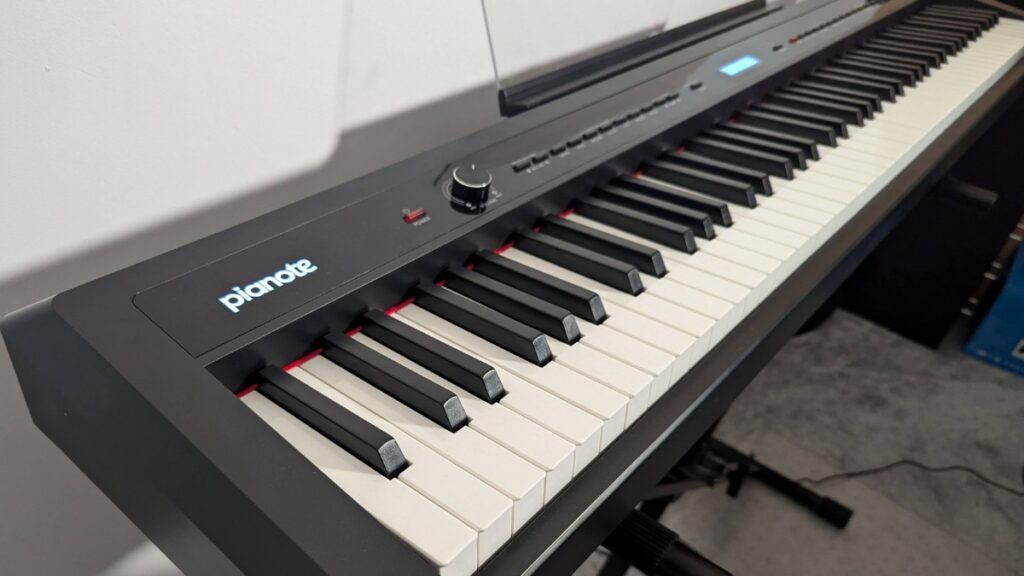
Overall, this digital piano just feels good to play. It’s ideal for beginners due to its hammer action, which makes it far easier to transition to using a real piano compared to if you were using a cheap keyboard with unweighted or semi-weighted keys. This way, you can build good technique and habits right from the start.
Honestly, I don’t think Pianote would have put their name on this digital piano if it didn’t meet this standard!
Sound Library
This piano offers a whopping 238 onboard sounds. These are divided up into a bunch of different categories in the instructional manual.
The quality of the bank of sounds varies quite a bit. Some of them sound fantastic, while others feel more like basic effects or sample sounds that may have limited practical use. I think there’s something for everyone here and which ones you use would depend on your style.
The sound bank is divided up into a bunch of categories of sounds such as piano, hammered instruments, organ, guitars, bass, string music, ensemble, brass, reeds, synth lead, synth timbre, synth effect, folk instruments, percussion, effects, folk music, and more.

Sounds I enjoyed the most
The very first sound, “Acoustic Grand Piano,” is excellent, especially when you turn on the “Effect” feature (which adds reverb) and use the sustain pedal to enhance its dynamics. This would be my main go-to preset when following along with Pianote’s lessons.
As a synth lover, I really felt at home trying out the synth voices, which I think are really decent. Of course, it’s a digital piano, so you’re not going to get the modulation, filter adjustments, etc as you would on an actual synth, but these were an added bonus I wasn’t expecting from this instrument.
Connectivity and Features
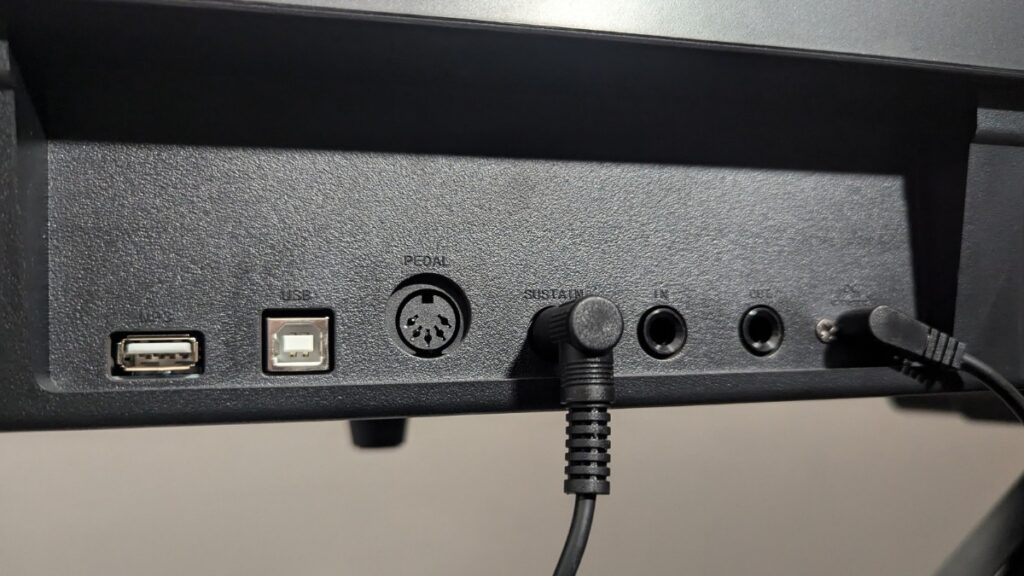
The Prima shines in its connectivity options:
- Stream music directly from your phone or other Bluetooth device directly to the instrument’s speakers or headphones
- Bluetooth MIDI and USB MIDI connections for connecting to music apps and DAWs
- Dual headphone outputs so you can plug in two sets of headphones at the same time
- Audio input/output
The Bluetooth implementation is very straightforward – I streamed music through the piano via my phone within seconds using Bluetooth. Just search for “Piano Audio” on your phone or Bluetooth device, select that, and it should pair straight away.
Dual audio headphone jacks on the front of the Prima:

Pianote Membership Included
The Pianote Prima currently includes an annual membership to Pianote, giving you full access to their fantastic step-by-step courses, live Q&A sessions, songs library, and much more.
It’s a fantastic option for beginners or anyone looking to improve. Check out our full Pianote review to learn more about what’s included.
If you’d like to give Pianote a try, then you can get a free 30-day trial using this link!

Accessories

The Prima comes with a high-quality sustain pedal that feels natural and responsive. While it doesn’t include a three-pedal unit, one can be purchased separately.
I didn’t get the stand and stool that Pianote offers, but they would undoubtedly be very useful to complete the setup.
While it would be nice if they offered a furniture-style or console stand option for a more polished look, the X stand is more versatile, so I can see why Pianote opted for this choice.
Ease of Use
The Prima is very easy to use. I found it pretty easy to figure out everything without the use of the manual.
However, I completely forgot it had Bluetooth connectivity until I checked the manual! It’s very easy to pair music via Bluetooth (See the “Connectivity and Features” section above where I explain how)
The buttons and screen are basic but they’re very functional and I wouldn’t expect more from an instrument in this price range.
Effect, Split, Dual Timbre, and Touch Features
Understanding the following four features of the Prima can really help you lock in the sound you’re looking for.
Effect Feature
The Effect button allows you to add a reverb effect to your sound. Think of it like playing in a concert hall. I always love a bit of reverb, so I use this a lot!
Split Feature
The Split feature lets you divide the keyboard into two parts, with each hand playing a different sound. For example:
- Your right hand can play a piano sound.
- Your left hand can play a bass sound.
It’s a great way to add depth to your music, especially if you want to imitate two instruments playing at the same time. Just press the Split button to toggle this feature and choose which sound you want on each side.
Dual Timbre Feature
The Dual Timbre button allows you to layer two different sounds together so that they play simultaneously when you press a key. For example, you could combine a piano sound with strings, creating an orchestral effect.
This is great for adding more depth to your sound. Just press the Dual Timbre button and every note you play will produce a combination of two different sounds.
Touch
The Touch feature adjusts how sensitive the keys are to your playing style. Just press the Touch button to cycle through the options.
Drum sounds
There are a ton of built-in drum rhythms with lots of different styles. They sound like a pretty standard drum machine but overall the quality and variety of these is better than I expected.
If you’re a beginner, you will get a lot of value playing around with these as it will stretch your abilities more than simply playing along to a metronome!
Demo sounds
The prima has 100 built-in demo sounds, I’d imagine that most students will ignore these for the most part.
However, since it’s using the internal sounds of the keyboard, you can use them as inspiration to explore different sounds available within the keyboard.
You can reproduce some of those sounds using the Split, Dual Timbre, and Effect functionality which I wrote about earlier in this article.
Recording
The Pianote Prima’s recording feature is very basic but gets the job done if you’re looking for a straightforward way to capture and play back your playing. Simply press the Record button to start, play your piece, and press the button again to stop and save.
You can then use the Replay button to listen to your recording. It’s a no-frills option that works well for tracking progress or reviewing your playing.
If you want a more comprehensive recording, use the audio output and connect it to your computer via an audio interface. Then you can record it into your DAW of choice, such as Logic Pro or Ableton!
Pedal
The included sustain pedal is great. I think it feels very natural to play. This piano doesn’t come with a 3-pedal board, but you can buy one separately and connect that (using what looks like a MIDI-type connection).
MIDI connection
It has both MIDI-over-USB as well as Bluetooth MIDI connection so you can connect the piano using external music apps or a DAW on your computer such as Ableton LIVE or Logic Pro.
MIDI capability is always a very welcome feature for recording and music production, so I’m very happy these features are included!
Verdict
The Pianote Prima is an impressive digital piano that truly exceeds expectations in its price range. With its realistic hammer action keys, diverse sound library, and versatile connectivity options, it’s a standout choice for beginners and intermediate players alike.
If you’re a beginner or budget-conscious piano player who’s been struggling to find a digital piano that can grow with you, I don’t think you’re going to go wrong with this.