The 10 Best MIDI Keyboards (2026)
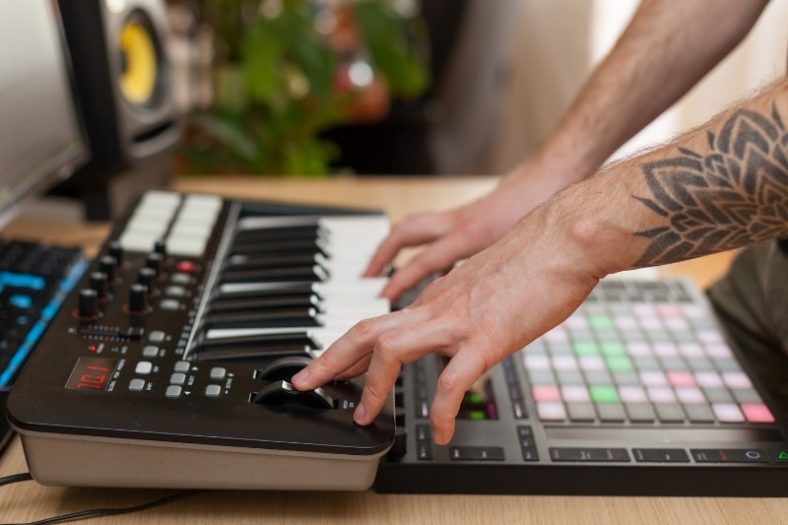
MIDI keyboards are useful tools for music production. Connect one to your DAW to play digital instruments, record melodies and control your software with keys, pads and knobs.
Fortunately, there are many great MIDI keyboards for different needs and budgets today. From the MIDI instruments with the feel of a full piano keyboard to the speed and lightness of synthesizer keyboards, there are different options with extra valuable features like sequencing, arpeggiation, and looping for extra creativity.
Among these MIDI keyboards, my top pick is the Novation Launchkey 49 MK4. It balances a full-size 49-key layout, useful DAW controls and creative tools without taking over a desk.
If you are looking for a more affordable entry-level MIDI keyboard, I recommend you check out the Akai Professional MPK Mini IV (Gray), a portable entry-level MIDI controller with nice features and a great value for the offered price.
Contents
- The 10 Best MIDI Keyboards (2026)
- 1. Novation Launchkey 49 MK4
- 2. Akai Professional MPK Mini IV (Gray)
- 3. Arturia KeyLab 49 MKII
- 4. Novation Launchkey Mini 25 MK4
- 5. Native Instruments Kontrol S61 MK3
- 6. Arturia KeyStep mk2 (32-Key White)
- 7. Nektar Impact LX61 mk3
- 8. Arturia KeyLab Essential 88 mk3 (Black)
- 9. M-Audio Oxygen 49 MKV
- 10. Nektar SE25
- What is a MIDI keyboard?
- What to look out for when buying?
- What key size is best?
- How many keys do you need?
- Conclusion
The 10 Best MIDI Keyboards (2026)


And now onto the full list:
1. Novation Launchkey 49 MK4
The Novation Launchkey 49 MK4 is my all-round choice for producers who want keys, pads and mixer controls in one controller. Its 49 full-size semi-weighted keys, 16 pressure-sensitive RGB pads, eight encoders and nine faders cover playing, clip launching and mixing. It sends MIDI to software or external hardware; it does not generate sound by itself.
Pros
- Full-size semi-weighted keys
- Pressure-sensitive pads and creative chord tools
- Easy to connect and play
- High performance and versatility with many controls and extra features
- Comes with great music software
Cons
- No key aftertouch, MIDI input or expression-pedal input
The semi-weighted keyboard offers more resistance than many small portable controllers. The pads support polyphonic aftertouch, which is useful for expressive drum and instrument parts. Scale, chord and arpeggiator modes help build ideas, while split and layer functions let the keyboard control more than one part. Key aftertouch is absent, so the KeyLab MKII or Kontrol S61 is a better choice when that matters.
USB-C makes it straightforward to connect to a computer, and the five-pin MIDI output can drive hardware. Ableton Live integration is a particular strength, with support for other major DAWs too. Ableton Live Lite is included to get started. There is no MIDI input or expression-pedal input, so check those connections before choosing it for a larger hardware rig.
| Keys | 49 full-size |
| Key action | Semi-weighted, velocity-sensitive; no key aftertouch |
| Controls | 8 encoders, 9 faders, pitch and modulation wheels |
| Connectivity | USB-C, five-pin MIDI out, sustain input |
| Power | USB bus-powered |
| Pads | 16 RGB pads with polyphonic aftertouch |
Whether you are a beginner or experienced in music production, the Novation Launchkey 49 MK4 offers a lot of versatility and quality to create your music easily.
2. Akai Professional MPK Mini IV (Gray)
The Akai Professional MPK Mini IV is a compact 25-key controller with eight pads, eight assignable encoders and an arpeggiator. Separate pitch and modulation wheels replace the MK3 joystick, while USB-C and five-pin MIDI output make it easier to use with a laptop or hardware synth. This recommendation is the gray model.
Pros
- Great value for the price
- Lightweight and portable
- Good MPC pads and features
- Comes with great music software
Cons
- Keys are pretty small
- Plastic buttons
Besides the great features, Akai’s MPK Mini IV is quite lightweight and portable, making it an ideal choice for musicians on the go. It looks like a simple keyboard to add melodies, basslines, and simple chords to your tracks, but it is a little powerhouse offering much more than that with its 8 MPC pads and 8 mappable encoder knobs.
| Keys | 25 mini keys |
| Key action | Velocity-sensitive |
| Controls | 8 encoders, pitch and modulation wheels |
| Connectivity | USB-C, five-pin MIDI out, sustain input |
| Power | USB bus-powered |
| Pads | 8 pads |
I would not recommend this keyboard to musicians with big fingers as the keys are pretty small. Plus, the buttons are made of plastic, but it is normal when the offered price is considered. This MIDI controller is an affordable solution for any studio, traveling musicians, and entry-level music producers.
3. Arturia KeyLab 49 MKII
The Arturia KeyLab 49 MKII remains a useful choice for a hybrid software and hardware setup. It has 49 full-size semi-weighted keys with aftertouch, 16 RGB pads, nine faders and nine rotary knobs. Its MIDI and CV connections are the reason I would keep it on the shortlist even alongside newer controllers. Standalone control means controlling an external instrument, not making sounds inside the keyboard.
Pros
- Useful control of external hardware
- Many connectivity options
- Easy-to-use
- Tight integration with the included AnalogLab software
Cons
- A bit pricey
- Small display
The MIDI keyboard comes with the Pro-Feel keybed, which feels great with high-velocity sensitivity. The keyboard has three modes: DAW, Analog Lab, and User, which lets you control external hardware or work with Analog Lab and your DAW. It has no onboard sounds.
Another great plus is its connectivity options which allow you to use the MIDI controller in combination with many other devices. It is deeply integrated with Analog Lab software, included in the package.
| Keys | 49 Full-sized |
| Key action | Semi-weighted, Velocity-sensitive with aftertouch |
| Controls | 9 faders, 9 rotary knobs |
| Connectivity | 1 x 1/4″ (sustain pedal), 1 x 1/4″ (expression pedal), 1 x 1/8″ (CV in), 3 x 1/4″ (aux), 4 x 1/8″ (CV out, gate out, mod 1, mod 2), USB, MIDI In/Out |
| Power | USB / Optional adapter |
| Pads | 16 RGB-backlit performance pads |
The Arturia KeyLab 49 MKII offers much more than a standard MIDI keyboard with its feature-packed and easy-to-use system.
4. Novation Launchkey Mini 25 MK4
The Novation Launchkey Mini 25 MK4 is a budget-friendly portable controller with 25 velocity-sensitive mini keys, 16 RGB pads with polyphonic aftertouch and eight encoders. It adds an OLED display and expanded chord, scale and arpeggiator tools to the compact Launchkey format. Pitch and modulation touch strips keep the footprint small.
Pros
- Great value for the price
- Good arpeggiator
- Great integration with Ableton Live
- Comes with many different software
Cons
- Mini-sized keys may be too small for some players
The keyboard shines with its great features and software for the offered price and works brilliantly with Ableton Live. You can also use it with different DAWs of your choice like FL Studio or Cubase. It has a versatile arpeggiator and a chord memory feature.
| Keys | 25 mini-sized keys |
| Key action | Velocity-sensitive, Synth-action keys |
| Controls | Pitch Bend, Touch Strip, Modulation, Touch Strip, 8 x Rotary Knobs |
| Connectivity | 1 x 1/4″ (sustain pedal)1 x 1/8″ TRS Type A (Out), USB |
| Power | USB bus powered |
| Pads | 16 x Velocity-sensitive RGB Pads |
Players with larger hands may find it awkward to use this keyboard as it features small-sized keys, but it is a great compact MIDI controller aimed at Ableton users. You can use it with software instruments or connect its MIDI output to a larger hardware setup.

5. Native Instruments Kontrol S61 MK3
The Native Instruments Kontrol S61 MK3 is a smart 61-key controller for players who use Kontakt and NKS instruments extensively. Its full-size semi-weighted Fatar keyboard adds polyphonic aftertouch, and one large high-resolution color display replaces the older a large color screen. The Light Guide and mapped controls make it easier to browse and play supported instruments.
Pros
- Complete keyboard with 61 keys
- Deep Kontakt and NKS instrument integration
- Smart MIDI keyboard with a large high-resolution screen
Cons
- No sliders or drum pads
- Pricey option
The keyboard maps supported NKS instruments to its eight touch-sensitive encoders, reducing the need to assign controls by hand. Pitch and modulation wheels, a touch strip and a navigation encoder add performance control. DAW transport and mixing functions are available, but this is not a replacement for a pad controller or fader surface. USB-C provides MIDI and power, with additional power requirements when using USB-A.
| Keys | 61 full-size |
| Key action | Semi-weighted Fatar with polyphonic aftertouch |
| Controls | 8 touch-sensitive encoders, navigation encoder, pitch/mod wheels, touch strip |
| Connectivity | USB-C, MIDI in/out, 4 pedal inputs |
| Power | USB-C; USB-A setups may need additional USB-C power |
| Pads | None |
If you use Kontakt or other NKS instruments regularly, the S61 MK3 is the specialist choice here. Polyphonic aftertouch lets you vary individual notes in a chord when the instrument supports it. Choose a different controller if you mainly need drum pads, physical faders or broad hands-on control of Maschine.

6. Arturia KeyStep mk2 (32-Key White)
The Arturia KeyStep mk2 keeps the portable 32-key format while adding a clearer OLED display and more accessible sequencing controls. Its slim velocity-sensitive keys support aftertouch, and MIDI, CV/Gate and sync connections suit small hardware or modular setups as well as a DAW.
Pros
- Compact and portable
- Versatile connectivity options
- Great value for the price
Cons
- Slim-sized keys
- Small keys favor portability over piano playing
This controller is useful when you want to sequence a hardware synth without relying on a computer. It provides a polyphonic step sequencer, pattern chaining, chord and scale modes, and an arpeggiator. Mutation controls add variation while the pitch and modulation strips remain easy to reach. The small keys save space, but are less comfortable for full piano parts.
| Keys | 32 slim keys |
| Key action | Velocity-sensitive with aftertouch |
| Controls | Pitch/mod strips, OLED encoder, sequencing and variation controls |
| Connectivity | USB-C, MIDI in/out, 4 CV/Gate outputs, sync in/out, sustain/expression |
| Power | USB bus-powered |
| Pads | None |
The Arturia KeyStep mk2 is a feature-packed yet simple-to-use MIDI keyboard for musicians on the go as well as beginner music producers who want a great entry-level MIDI keyboard.

7. Nektar Impact LX61 mk3
The Nektar Impact LX61 mk3 is a reasonably priced 61-key controller for producers who want a larger playing range and hands-on DAW control. Nektar’s integration supports a range of major DAWs, and NKS support adds mapped control for compatible instruments. Check the current integration instructions for your particular DAW before setting it up.
Pros
- Excellent DAW integration
- Reasonably priced MIDI keyboard
- Pre-mapped controls
- Very versatile
Cons
- Non-weighted keys
Although the LX61 mk3 does not have weighted keys, it brings many other things to the fold. The DAW integration is a sought-after trait for most musicians, and the pre-mapped controls save you a lot of time and provide easy navigation and use.
The LX61 mk3 has eight faders, eight regular encoders and a larger global encoder, eight velocity-sensitive illuminated pads, and pitch and modulation wheels. Chord, scale and hold modes add performance options. USB-C carries MIDI and power, and there is a footswitch input; there are no five-pin MIDI sockets.
| Keys | 61 full-size |
| Key action | Synth action, velocity-sensitive |
| Controls | 8 faders, 8 encoders plus global encoder, pitch/mod wheels |
| Connectivity | USB-C, footswitch input; no DIN MIDI |
| Power | USB bus-powered |
| Pads | 8 illuminated velocity-sensitive pads |
Overall, the Nektar Impact LX61 mk3 is a very versatile MIDI keyboard that offers useful DAW integration, has pre-mapped controls, and backlit LED pads, and comes at a reasonable price.

8. Arturia KeyLab Essential 88 mk3 (Black)
The Arturia KeyLab Essential 88 mk3 gives producers the full 88-key range without the weight and feel of a hammer-action controller. Its full-size semi-weighted keys, eight RGB pads, nine knobs and nine faders suit software instruments and DAW work. This is the black Essential model, rather than the more expensive full KeyLab 88.
Pros
- A great number of control options adds versatility
- Many connectivity options
- Great feeling 88 keys
- 8 velocity-sensitive RGB pads
- Great build quality
Cons
- Relatively small display
The KeyLab 88 gets integrated with the most popular DAWs easily, and it comes with Ableton Live Lite and Analog Lab software. Plus, it is a relatively portable device with a sturdy build quality.
The semi-weighted action is useful for synth parts and arranging across a wide range, but it is not the piano action of a weighted stage keyboard. The display helps navigate sounds and assignments. If piano technique is the main priority, I would choose a hammer-action controller instead; this Essential model favors flexibility and portability.
| Keys | 88 full-size |
| Key action | Semi-weighted, velocity-sensitive; no key aftertouch |
| Controls | 9 knobs, 9 faders, pitch/mod wheels |
| Connectivity | USB-C, MIDI out, sustain input; no CV/Gate |
| Power | USB bus-powered |
| Pads | 8 RGB pads |
Overall, I recommend the Arturia KeyLab Essential 88 mk3 to producers and musicians who like to work with different DAWs to create music frequently.
9. M-Audio Oxygen 49 MKV
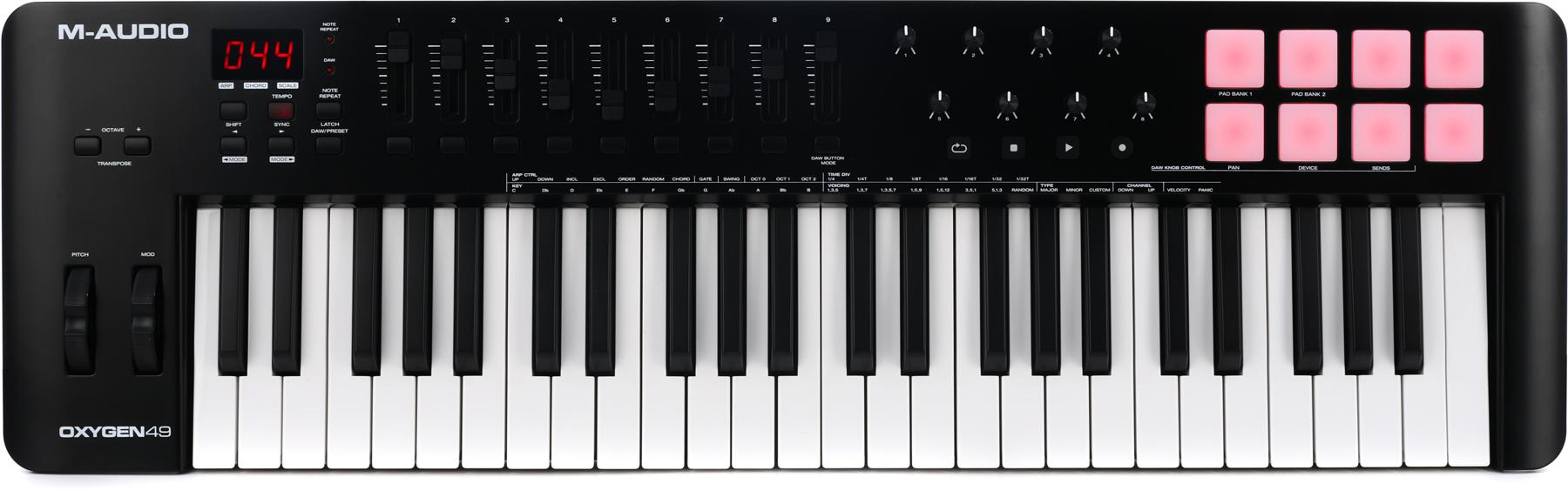
The M-Audio Oxygen 49 MKV is a straightforward entry-level controller with 49 full-size velocity-sensitive keys, eight pads, eight knobs and nine faders. Smart Chord, Smart Scale and the arpeggiator help beginners experiment with parts while DAW controls handle basic recording tasks. It is USB-only for MIDI, so it suits a computer-based studio rather than a stand-alone hardware rig.
Pros
- Great value for the price
- Easy to use, beginner-friendly
- 49 Full-sized velocity-sensitive keys
Cons
- No classic MIDI ports (USB-midi)
The MIDI controller has everything to get beginners started producing music. It also has 8 velocity-sensitive pads, which adds to the versatility of the device.
Some drawbacks are the plastic build and the lack of classic MIDI ports, but these are quite acceptable as this is an entry-level affordable MIDI tool. USB connects the keyboard to your laptop, which is enough for this computer-based role.
| Keys | 49 full-size |
| Key action | Synth-action, velocity-sensitive |
| Controls | 8 x Assignable Knobs, 9 x Assignable Faders |
| Connectivity | 1 x 1/4″ (sustain pedal), USB |
| Power | USB powered |
| Pads | 8 velocity-sensitive |
Overall, the M-Audio Oxygen 49 MKV is a useful beginner keyboard for a home studio. Its mix of keys, pads and faders gives you room to learn without committing to a more specialized controller. Its performance modes are useful starting points for experimenting with melodies and chords.
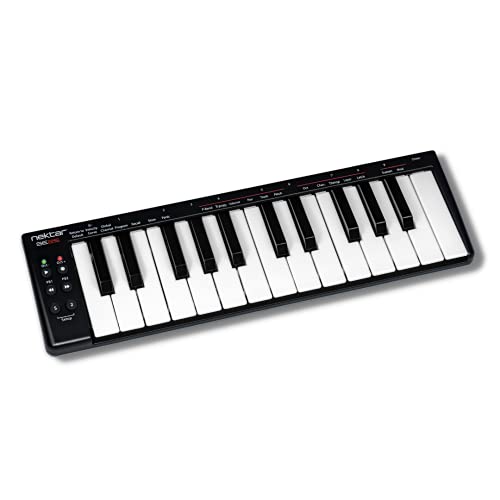
10. Nektar SE25
The Nektar SE25 is an extremely affordable, simplistic, and portable MIDI keyboard with 25 mini-sized synth-weighted keys with velocity sensitivity. It does not have many features, but it gets the job done successfully with its ease of use and simplistic approach.
Pros
- Lightweight, compact, and portable
- Simple yet sturdy design
- Great value for the price
- Highly easy to use
Cons
- No pads
- No five-pin MIDI ports
The SE25 has two assignable controls and two buttons for its pitch bend, pan, transpose, sustain, and modulation features. It does not have pads or five-pin MIDI ports, making the device slightly less versatile. But, it is designed for affordability, portability, and simplicity, so the lack of these features should not be a deal-breaker.
| Keys | 25 Mini-sized |
| Key action | Synth-weighted, velocity-sensitive |
| Controls | PB1, PB2 (assignable to pitch bend, Pan, Transpose), S Buttons (sustain, modulation) |
| Connectivity | USB |
| Power | USB bus powered |
| Pads | None |
If you are looking for a basic and reliable MIDI keyboard with a portable design, the Nektar SE25 is an ideal choice.
What is a MIDI keyboard?
A MIDI keyboard is a piano-keyboard-shaped device that interacts with music-making software called DAWs by sending them MIDI messages. These messages are translated into sound by the software plugins or virtual instruments in DAWs. They let you play software or hardware instruments; MIDI itself does not carry audio.
MIDI keyboards are often connected to the PC or laptop with USB or MIDI cables to send them MIDI messages. When you press a key or a pad on the MIDI device, the music-making software receives the message and uses it to trigger the sound you selected. From drums to synths, pianos to string instruments, you can map your keyboard to create any sound you like to play in real time or record.
Most MIDI keyboards have additional functions like programmable pads, faders, encoders, arpeggiators, and sequencers for added versatility in terms of composing and performing.
What to look out for when buying?
When buying a MIDI keyboard, things to consider are the key number, size and action, portability, additional features like pads, and of course, the price. Depending on your needs and budget, you should go for a MIDI controller with a good balance of features.
Keys are the most critical elements of MIDI keyboards. A good MIDI keyboard should feature velocity-responsive keys with a preferably full-size semi-weighted design. But, synth-weighted keys are more affordable and can get the job done if you are not after a piano feel. More keys mean more control, but it also means you are sacrificing portability for control with more keys.
Another vital factor is portability. You should opt for fewer keys if you frequently carry your gear around. But, if you are going to use the MIDI device in the studio and not move it around, you should go for more keys and features as they give you more versatility.
Additional features like pads, control knobs, faders, and sequencers all come in handy for more control of your DAW and fewer mouse movements. If you want to use your MIDI keyboard to fully control your DAW, you should look out for these extra features.
And, of course, more features, more portability, and a good key feel all raise the price. If you have the budget for it, you can go all in without hesitation, as MIDI keyboards are essential devices for music production. Otherwise, check your needs and sacrifice some aspects while focusing on others to find the right product.
What key size is best?
Key size is an important factor with MIDI keyboards. Full-size keys are recommended for better feel and control, especially for piano players. Mini-size keys are harder to control and do not provide a real piano feel. But, mini-size keys elevate the portability of the device.
How many keys do you need?
A MIDI controller should have a minimum of 25 keys which equals two octaves. Often they feature 49 keys, four octaves which is the recommended amount. More keys are better if you are after the piano feel. However, the music type and the need for portability determine the right amount of keys for the user.
Conclusion
As MIDI keyboards are some of the most crucial gear for music production today, there are many different models for different needs on the market. It is quite easy to get confused and overwhelmed by the choices. But, analyzing your needs and researching well can easily get you what you need to purchase the ideal MIDI keyboard for you and start producing music as soon as possible.
My top recommendation among the best MIDI keyboard controllers is the Novation Launchkey 49 MK4, a great MIDI keyboard with a great balance of features, feel, and price.
If you want something more affordable, you can go with the Akai Professional MPK Mini IV (Gray) model, a great entry-level, compact, and portable MIDI keyboard with a great value-for-price ratio.