Cakewalk by BandLab Review
Despite being completely free, Cakewalk by BandLab had powerful features that made it a very capable DAW for professional use. Available exclusively for Windows, its flexible workflow made it worth exploring for songwriters, producers, and engineers alike.
Cakewalk by BandLab is a digital audio workstation that is known for its advanced DAW technology and award-winning user interface. Originally called Sonar, the DAW was acquired by BandLab Technologies in 2018 and relaunched as Cakewalk by BandLab.
Read on for our review of Cakewalk by BandLab’s workflow. It has now been retired, with Cakewalk Sonar as its supported successor.
Contents
Best Features
- Cakewalk by BandLab was completely free and fully featured. It no longer receives updates or activation support. Cakewalk Sonar now offers a free tier that can record, edit, mix, save, and export projects; paid Membership adds further features. The Melodyne add-on supplied with the legacy DAW was a trial, rather than a permanent full license.
- Cakewalk’s Help module makes learning the DAW a quick and streamlined process. It is useful even for veteran users of Cakewalk and acts as a handy guide whenever required.
- Cakewalk affords users a large amount of flexibility in choosing the layout, color theme, and display settings. A lot of the DAW’s features are designed to increase workflow efficiency.
- Cakewalk’s 64-bit mix engine, ProChannel, and mixing console interface combine to give the user a sleek mixing experience.
- Cakewalk offers unique Audio and MIDI features and allows users to adjust plug-in parameters using MIDI controllers.
Workflow and Interface
One of the strongest features of Cakewalk is perhaps its highly customizable user interface.
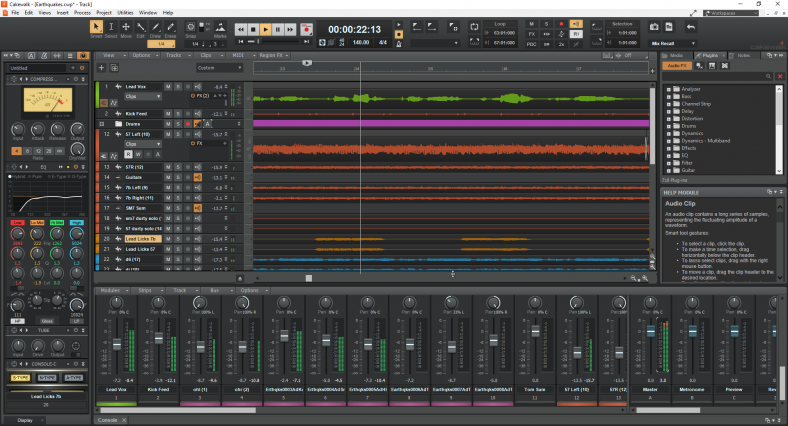
When it comes to selecting a layout or workspace, Cakewalk users are spoiled for choice. To start with, Cakewalk allows you to choose from a set of pre-existing templates, each of which is designed to serve a specific purpose. Selecting the Mix or Arranger workspace, for instance, brings up only the tools and windows most relevant for mixing or arranging respectively.
The Basic workspace, which is the default layout, has a Help module docked at the bottom-right corner of the screen. This module gives clear, concise information about the functions and usage of all the options and controls, making it a great asset for new Cakewalk users. All you need to do is hover over a button, and the Help module will tell you what it does.
Additionally, beginner producers are likely to find Cakewalk comparatively easier to navigate, as the default workspace displays only limited controls. Of course, once you’re comfortable with all the knobs and buttons and are unlikely to feel overwhelmed by more of them, you can shift to the Advanced workspace as required.
You can also contract, expand and move the track/console areas around, or dock/undock them as needed. You can save the changes you make to a workspace, or create a new workspace that you can access later from the Workspaces menu. In the current Sonar, the Workspaces feature requires an active Membership, so this legacy review’s customization options are not all included in the free tier. Cakewalk lets you toggle seamlessly between the different workspaces at any time.
The View Menu allows you to add different views to your workspace. The staff view, for example, can be used to enter notes in the form of musical notation. This is a feature that is rare to find in popular DAWs. If you’re a classically trained musician and prefer working with sheet music or guitar tablature, Cakewalk gives you that option.
If you want to make beats, you can similarly add a Matrix view to your screen from the View menu. However, selecting the Make Beats workspace will automatically display the Matrix view. So, even though you can always adjust the layout manually each time, having these designated workspaces on hand will simplify your workflow and significantly increase efficiency.
Another advantage of using Cakewalk is the flexibility to change the color theme and graphics of the display. Cakewalk offers two options for the color theme: Tungsten – characterized by a grayish-black finish and gold highlights, and Mercury – characterized by a silver-gray finish with smatterings of neon blue. You can even install the ‘Theme Editor’ as an add-on, and use it to modify every part of your theme.
Cakewalk also lets you choose and add icons to your tracks. These icons are useful to quickly identify and locate tracks in the track view or the mixing console. It is much easier to spot a picture of a keyboard than it is to scour through track names for the one that says ‘Si-ElectricPiano1.’
A smooth workflow is essential for musicians to be able to write and produce music effectively. With pre-set workspaces, an effective Help module, track icons, and more, Cakewalk ensures its users get just that.
Mixing Console
Cakewalk has a powerful mixing console that is designed to streamline and speed up the mixing process.
One of Cakewalk’s most useful features is the existence of ProChannel. ProChannel is a collection of audio processing modules available by default on each channel of the console. It includes a compressor, equalizer, tube saturation, and a console emulator.
You can move the modules up or down in the effects chain and insert, replace or remove modules. Having all of this in a single processor – already available on each channel strip – enables users to quickly and easily enhance the sound of any track or bus.
Cakewalk’s console consists of the individual tracks to the left and the buses to the right. The three default buses in Cakewalk are the Master bus, the Metronome Bus, and the Preview Bus, and any bus you create is added further to the right of these.
In an effects chain in Cakewalk, the signal goes from top to bottom. Cakewalk makes it easy for users to change the order of effects by simply dragging the plug-ins up or down in the FX Rack. The console’s interface makes it very convenient to create sends and buses, and also to see – and control – how the signal branches out.
Another interesting feature is that you can automate track parameters like volume or panning by using the Automation Write button on the channel strip. When Automation Write is enabled, the changes or tweaks in knobs/faders are recorded as the track plays. You can later manually fine-tune the automation using the pen tool.
However, possibly due to the availability of so many controls on each channel strip, the level meters are quite small. You may find it easier to use third-party meter plugins to check the levels.
For a more organized mixing workflow, you can choose to colorize individual tracks or buses using colors from the color palette. You can name the channels and add suitable icons for faster identification.
An especially useful tool while mixing a project is the mix recall option. It allows you to revert to – or toggle between – previous states or ‘scenes’ in the mix. This enables users to freely make changes to a mix without having to save each checkpoint as a separate project.
Mixing can be a tedious process – especially for musicians who do not have a strong background in sound engineering. Cakewalk’s mixing console does well in simplifying the process to a reasonable extent.
Working with Audio and MIDI
Cakewalk allows users to seamlessly record and edit external audio. You can simultaneously record multiple tracks using different microphones. You can comp takes, overwrite existing recordings, or even record sound on sound.
Cakewalk also lets you record MIDI without any difficulty. It has great piano roll features that you can use to edit the recorded notes. To fine-tune the timing, you can either use quantization or shift and snap particular notes to the grid. The Controller Lane Pane at the bottom of the piano roll lists all the parameters that can be edited. You can adjust the velocity of each note or, if you’ve used a sustain pedal, you can change the sustain points too.
Cakewalk can convert audio data to MIDI data. All you need to do is drag an audio clip to a MIDI or Instrument track and the audio data will be converted to a MIDI clip. Cakewalk uses the Melodyne engine to analyze the audio and convert it to MIDI. You need a suitable installed Melodyne edition or active trial for the conversion you want; polyphonic conversion has different edition requirements from monophonic conversion.
Yet another potent feature is Cakewalk’s Active Controller Technology or ACT. ACT allows you to tie parameters of an effect or soft synth plug-in to MIDI control. In other words, you can adjust the different parameters of the plug-in by simply tweaking the knobs/sliders in your MIDI controller. You can also edit the default ACT mappings to choose which slider/knob of your controller you want to use to control a particular parameter.
stock plugins and Effects
Cakewalk comes with a set of inbuilt plug-ins for effects and virtual instruments.
Most of the stock plug-ins are effects plug-ins, and options for virtual instruments are limited. Cakewalk offers only a drum kit, a bass guitar, an electric piano, and a string section. These plug-ins are quite decent, however, and can be used to create relatively realistic instrument sounds.
Out of Cakewalk’s numerous effects plug-ins, some are quite potent and can be used to effectively shape sounds.
Sonitus Equalizer has six bands, each with the option to choose a filter type, frequency, Q value, and gain. At first glance, it seems like only the gain parameter has a slider, and the frequency and Q values can only be typed in manually. This makes it extremely difficult for users to do frequency sweeps or adjust parameters through trial and error.
I did eventually find keyboard/mouse commands that let me sweep through the parameter values, but I found the overall interface inconvenient to use.
Similar issues are seen with the Sonitus Compressor. While these plug-ins can technically do most of what any other popular plug-in could, their user interfaces leave much to be desired. If external plug-ins are not available, I would prefer to stick to the modules in ProChannel for effects such as compression and equalization.
Cakewalk has two stock plug-ins manufactured by Overloud – a reverb plug-in and a guitar amp simulator.
Musicians working primarily with electronic music may want extra synthesizer plug-ins alongside the legacy instrument bundle. External VST instruments expand the options considerably, and the current Sonar also has an integrated sampler, so this part of the older bundle should not be mistaken for a limit on the whole DAW.
Working with External Plugins
VST plug-ins can be used in Cakewalk, including VST3. Current Sonar also supports VST plug-ins; native 64-bit versions are preferable when available, while BitBridge provides a compatibility path for older 32-bit VST plug-ins.
The process of scanning and using external plug-ins in Cakewalk is quite straightforward. Their stability depends on the individual plug-in, its version, and the system it runs on.
However, Cakewalk does not support plug-ins of the AU format, as these are only for Mac.
CPU Usage
The legacy Cakewalk by BandLab had modest system requirements, but those are not a buying or setup guide for current Sonar. Cakewalk’s current English-language requirements list Windows 11 or newer, 16 GB RAM, and an 8-core CPU or native ARM64 system. Track freezing and archiving are still useful ways to manage demanding sessions.
For instance, instead of simply muting, it lets you archive or disable tracks that aren’t being used at a particular time. You can also temporarily freeze a track and bounce it with all its effects to a new clip. This helps in reducing the load on the CPU during playback.
When it comes to CPU usage, the project, plug-ins, audio driver, and buffer settings make a big difference. Large sessions can still produce audio dropouts, so freezing tracks or reducing active processing may help. There is no single efficiency ranking that applies to every DAW setup.
Evolution of the Sonar DAW
Sonar was a DAW created by the former music production software company Cakewalk.
Some versions of Sonar were released in subsequent years, each with major updates. With the release of Sonar X2 in late 2012, the full program family became native 64-bit.
Sonar Platinum was released in January 2015. From then onwards, new versions were released monthly, with additional features and demo products included with each update.
In November 2017, the parent company Gibson stopped all active development and production of Cakewalk products, including all versions of Sonar. Less than four months later, Singapore-based BandLab Technologies announced that it had purchased Cakewalk’s intellectual property.
Within a month of the purchase, BandLab relaunched Sonar and rebranded it as Cakewalk by BandLab. BandLab also decided to make the DAW completely free and continued developing its features.
Drawbacks of Cakewalk by BandLab
A major drawback of this DAW family is that Sonar remains Windows-only. The current requirements specify Windows 11 or newer; the English support page says it can install on Windows 10, but that version is not officially supported. The old Windows 7-or-higher advice for Cakewalk by BandLab should not be used to choose a system for Sonar.
Cakewalk isn’t as good for live performance compared to DAWs such as Ableton Live, Bitwig, or Logic Pro.
There are not as many tutorials available solely tailored to Cakewalk in comparison to more popular DAWs.
Future of Cakewalk by BandLab
Cakewalk by BandLab has been fully retired, including its activation support. Development has moved to Cakewalk Sonar, which continues the same DAW lineage with an updated interface and further features. Existing .cwp projects can be opened in Sonar, making it the practical route for continuing work on older sessions.
You can install Sonar through Cakewalk Product Center and sign in with a free BandLab account. A paid Membership is optional for the core DAW, although it unlocks additional tools. Keep the project’s audio files and any separately licensed plug-ins available when moving a session to a new installation.
Sonar’s free tier is currently offered without a fixed license expiry, but it still needs periodic activation. That is different from a time-limited trial. If you need custom Workspaces or other premium tools, check the current tier comparison before assuming that every feature described in this legacy review is free.
Verdict
Cakewalk by BandLab uses advanced DAW technology to create features that can greatly enhance your workflow if applied correctly. It also offers lots of options for customization and caters to the needs of all types of musicians. Although the collection of stock plug-ins is slightly disappointing, I find that this DAW has helped me explore possibilities and learn much faster than any other.
It’s admirable that BandLab has kept a free route into this DAW family. For new installations and existing projects, Cakewalk Sonar is now the version to consider. The workflow observations above remain useful context, while its current free and Membership tiers determine which additional tools you can use.