The 7 Best Sound Cards for Music Production (2026)
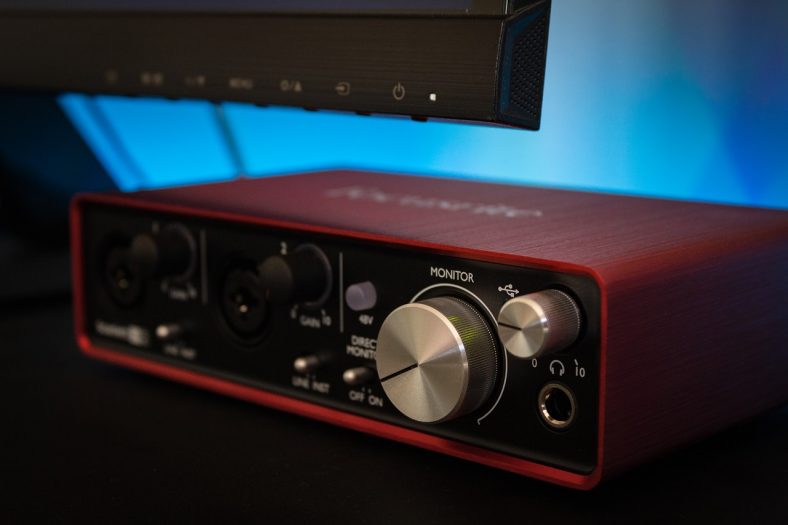
A sound card (or audio interface) is a crucial component of music production. This unit has enabled the possibility of music processing through the modern computer in every home and studio across the globe.
Default sound cards that are already integrated with most computers and laptops cannot compare to a fully-fledged sound card or audio interface. Luckily, there are great options out there in terms of technology, hardware, usability, and affordability.
My top pick is the Focusrite Scarlett 2i2 4th Gen. This is a highly popular audio interface that includes a great software bundle.
My budget pick is the PreSonus AudioBox USB 96. This is a beginner-friendly and affordable option for a good sound card/audio interface.
Contents
- The 7 Best Sound Cards for Music Production (2026)
- 1. Focusrite Scarlett 2i2 4th Gen
- 2. PreSonus AudioBox USB 96 25th Anniversary
- 3. Universal Audio Apollo Twin X DUO Gen 2 (Thunderbolt)
- 4. Yamaha UR22MK3 (Black)
- 5. Arturia MiniFuse 2 (Black)
- 6. Audient iD14 MKII
- 7. Behringer UMC404HD
- How important is a good sound card for music production?
- Does a soundcard matter for recording?
- Does a soundcard improve the audio quality of recordings?
- What are the key features to consider while buying a soundcard?
- Summary
The 7 Best Sound Cards for Music Production (2026)




Let’s compare these in more detail.
1. Focusrite Scarlett 2i2 4th Gen
Focusrite has conquered the market with the Scarlett range of soundcards. The 2-in/2-out Scarlett 2i2 (4th gen) is an integral part of the legacy they’ve built in the past decade. The interface works with Focusrite Control 2 and includes current starter recording software and the Hitmaker Expansion bundle; check Focusrite’s current registration offer for the exact licenses.
The 2i2’s 4th Gen avatar boasts of upgraded, ultra-low-noise preamps with better headroom and “Air mode” for top-end detail. Besides this, it retains all the great design elements of its predecessors. This includes the gain knob, inputs, outputs, phantom power (48 volts), and USB-C port.
I’ve picked this unit as my “Top Pick” based on the exemplary audio quality. This is evidenced by the low noise, low latency, and excellent clarity in its performance. The Air feature elevates the 2i2 into a new league of impressive audio quality, especially when you record vocals in a home studio.
The highly detailed audio quality, thoughtful upgrades, and long list of features make the Scarlett 2i2 a formidable option for new and experienced recording artists alike. The 4th Gen 2i2 is proof that Focusrite is at the top of its game of great quality interfaces that won’t break the bank.
2. PreSonus AudioBox USB 96 25th Anniversary
The PreSonus AudioBox USB 96 is one of the most affordable USB 2.0 audio interfaces on the market. It’s a compact and convenient 2-channel sound card for home studios. Don’t let the price fool you, this is still a quality interface that records at up to 24-bit/96kHz standard digital resolution.
It features dual preamps with combo inputs so you can record a microphone and an instrument if you want. Plus, it does have an onboard +48 phantom power if you have a condenser microphone. This is one of the most useful and convenient interfaces you can have for your setup.
In terms of software included, you get Studio One Artist and Studio Magic Plug-in Suite. You can pick and choose from a vast number of effects like Amp Modeling, Delay, Distortion, Dynamics, EQ, Filter, Gate, Modulation, Reverb, and so much more for recording just the way you want.
This Mac/PC compatible interface is a very affordable sound card option if you want something with quality sound capabilities and recording options but don’t want to break the bank.
3. Universal Audio Apollo Twin X DUO Gen 2 (Thunderbolt)
The Apollo Twin X DUO Gen 2 is the premium choice here for a producer who wants to monitor and record through UAD plug-ins. It connects over Thunderbolt 3 and has two Unison mic preamps, two onboard DSP cores and optical input expansion. Check that your computer supports Thunderbolt before choosing it; USB-C connector shape alone does not guarantee compatibility.
The Gen 2 version adds Auto-Gain and improved conversion and monitor controls. The console workflow is useful when you want to shape a vocal or instrument sound during a take, while the optical input gives you room to expand later. Its 10-in/6-out count includes digital expansion rather than ten built-in mic sockets.
This is the strongest specialist pick in the list, but it is more interface than most first-time producers need. If your setup is straightforward and you do not need the UAD DSP workflow, the Scarlett 2i2 remains the easier general recommendation. The DUO has two DSP cores; choose a QUAD separately if your sessions need more onboard plug-in capacity.
Pros
- Two Unison mic preamps and real-time UAD DSP monitoring
- Thunderbolt connection and optical input expansion
- Auto-Gain and flexible monitor controls
Cons
- Requires a compatible Thunderbolt computer
- Two onboard DSP cores can limit complex plug-in chains
- More complex and costly than a basic two-input interface
4. Yamaha UR22MK3 (Black)
Yamaha’s UR22MK3 brings the familiar sturdy two-input layout into a current USB-C interface. It has two mic/line combo inputs, phantom power, direct monitoring and loopback, which makes it practical for a songwriter recording voice and an instrument or for a simple stream. The metal enclosure suits a setup that moves between rehearsal space and desk.
The current Yamaha model includes Cubase AI and Cubasis LE, so it offers a useful entry into recording without claiming a full Cubase license. Its loopback can capture computer playback alongside your inputs. A front-panel mute and separate monitoring controls make ordinary sessions easy to manage.
One important difference from the older Steinberg UR22mkII: the UR22MK3 has no five-pin MIDI input or output. If your hardware synths or drum machines rely on those ports, the Arturia MiniFuse 2 below is a better fit. Otherwise, the Yamaha is a capable, straightforward interface for two-source recording.
Pros
- Two microphone preamps and direct monitoring
- USB-C, loopback and sturdy construction
- Cubase AI and Cubasis LE included
Cons
- No MIDI input or output
- No optical expansion
- Only two simultaneous analog inputs
5. Arturia MiniFuse 2 (Black)
The Arturia MiniFuse 2 is my compact choice for someone who wants to record two microphones or instruments while keeping a hardware synth in the setup. It offers two combo inputs, USB-C bus power, five-pin MIDI in and out, a headphone output and a small USB hub. That combination makes it useful on a crowded writing desk or in a portable rig.
Its direct-monitor mix control helps when tracking without distracting delay, while the loopback channel is useful for recording computer audio or streaming. Arturia includes Ableton Live Lite, Analog Lab Intro and a selection of effects, giving new producers enough tools to get started. Trial subscriptions are time-limited extras, so check current entitlements at registration rather than treating them as permanent licenses.
The MiniFuse 2 earns this place through its compact design and the useful combination of MIDI connections and loopback. It does not have the optical expansion of the Audient iD14 MKII or the four microphone inputs of the UMC404HD, so those remain better choices for growing studio I/O or a small ensemble.
Pros
- Two mic/instrument inputs plus five-pin MIDI
- Portable bus-powered design with loopback
- Useful starter music software
Cons
- No ADAT or S/PDIF expansion
- Two-input limit for recording groups
- Bundled trials need separate renewal if you keep using them
6. Audient iD14 MKII
The Audient iD14 MKII is another very convenient option. It’s a 10-in/6-out USB-C Audio Interface with two microphone preamps and one JFET instrument input for reproducing guitar, bass, or keyboard signals. With so many connectivity options, the possibilities are endless.
First off, you have two combo XLR inputs and four line outputs. Those four line outputs can feed two pairs of monitors or provide additional routing. Its two headphone sockets share the headphone amplifier. Naturally, it’s bus-powered so you won’t need a power supply, which makes it a very travel-friendly option.
Construction-wise, it’s a very durable interface with an all-metal chassis so you don’t have to worry about it breaking easily. The design is very attractive and features a 3-knob interface with ScrollControl which lets you use the big volume knob to tweak DAW/plug-in parameters.
Being Mac and PC compatible with the included ARC software suite, the iD14 MKII is a great value-for-money purchase that offers so much, conveniently packed in a stylish recording box.

7. Behringer UMC404HD
The UMC404HD has a 4-in/4-out config that is loaded with four dedicated preamps, a rarity in this price bracket. The preamps are quiet and transparent and the overall sound quality is great for the price.
The panel gives you access to Line/Instrument switches, gain knobs, pad switches, and jack inputs for the designated in/out channels connected to Midas-designed preamps. Each channel has dedicated controls that are easy to access and tweak.
Behringer has equipped it with A/B monitor switching, monitor mix, and a stereo/mono switch that will come in handy when you want to audition your mixes. It also includes MIDI compatibility and LED indicators.
This feature-packed unit punches above its weight and its value makes it the strongest four-mic budget option in this list. The UMC404HD includes a software suite that includes recording software and plug-ins. Overall, it is a fantastic option for musicians, producers, podcasters, and recording enthusiasts, especially if you are just starting out.
How important is a good sound card for music production?
A reliable sound card is essential if you plan to produce music and achieve a professional sound. It allows you to record instruments like the guitar, bass, keys, and vocals at home or in a studio. It also enhances the audio quality of the playback of recorded audio.
Whether you are a producer who solely makes electronic music or a songwriter who needs to consistently record live instruments, you’ll need a consistent and capable sound card. Your choice of an audio interface will dictate the efficacy and quality of your workflow.
Does a soundcard matter for recording?
You can avoid getting an external sound card if you are into music production. However, this means you will use the basic soundcard on your laptop or PC. For recording, an external interface adds microphone and instrument inputs, direct monitoring and suitable low-latency drivers; whether it helps a playback-only workflow depends on your computer and setup. On the other hand, a good sound card will allow you to record external sources like microphones and instruments into your DAW and computer.
Does a soundcard improve the audio quality of recordings?
Audio quality is closely associated with the quality of your sound card or audio interface. Moreover, the inputs and outputs of your device will also determine how many instruments you can record simultaneously. In fact, the sound card also improves the audio that you hear from your speakers and/or headphones as you play files and videos.
What are the key features to consider while buying a soundcard?
Generally, recording enthusiasts should factor in the sound quality, preamp, price, Digital I/O, and connection format before choosing a sound card. Everyone has unique needs, so identify your application and budget, which will narrow down your choices before you compare other features.
Summary
Whether you’re a curious novice or a seasoned recording artist, today’s market has a plethora of choices to bewilder you. I hope this article has helped you find the right sound card for your needs and budget.
My top pick is the Focusrite Scarlett 2i2 4th Gen, a highly popular, best-selling audio interface that includes a great software bundle.
My budget pick is the PreSonus AudioBox USB 96, a beginner-friendly and affordable option for a good sound card/audio interface.