The 6 Best Wireless Bluetooth MIDI Controllers (2026)

Wireless Bluetooth MIDI controllers let you play software instruments without a USB cable to your computer or tablet. Here are 6 options for portable keyboard parts, beat programming, and hands-free control.
My main recommended Bluetooth MIDI controller is the CME Xkey Air 37. With Polyphonic aftertouch and realistic responsiveness, this compact MIDI controller is a widely compatible and highly popular option.
My second recommended Bluetooth MIDI controller is the Korg microKEY Air-25, an extremely portable, affordable, and popular choice. It comes with 25 mini keys, a joystick, and Bluetooth or USB connectivity.
I did extensive research and rated the controllers based on their key features, including the number and quality of pads, knobs, and faders, their battery life, compatibility with different software and platforms, and their design and build quality.
With a MIDI controller, you could seamlessly switch between different sounds and effects without having to physically move to another instrument. It also gives you the freedom to move around the stage and interact with the crowd while still playing. Overall, a Wireless Bluetooth MIDI Controller adds a new level of versatility and excitement to any performance.
Contents
- The Best Wireless Bluetooth MIDI Controllers (2026)
- 1. CME Xkey Air 37
- 2. Korg microKEY Air-25
- 3. Korg microKEY air 37
- 4. Korg nanoKEY Studio
- 5. IK Multimedia iRig Blueboard
- 6. ESI Xkey Air 25
- Key Features and Specs to Consider in a Wireless Bluetooth MIDI Controller
- Buyers Guide
- Connecting Bluetooth MIDI Controllers to Devices
- Bluetooth vs. Wired MIDI Controllers
- Price Range and Budget Considerations
- FAQs
- Conclusion
The Best Wireless Bluetooth MIDI Controllers (2026)
Let’s move on to the full list:

1. CME Xkey Air 37
The CME Xkey Air 37 MIDI gives you a top-notch playing experience with full-size piano keys for a familiar and comfy touch. It has excellent dynamics, including velocity sensitivity for skilled playing and more expression. Its polyphonic aftertouch is better than most keyboards, letting you explore music with a stylish and modern instrument that seasoned musicians appreciate.
Pros
- Full-size, portable keys
- Low latency and great responsiveness
- Bluetooth and USB connectivity
- Supports multiple devices: PC, iPad, Microsoft Surface Pro, Mac, Android
- Aluminum construction and sleek design
- Polyphonic aftertouch for expressiveness
Cons
- Shallow key travel differs from a conventional keyboard
- Pricey
This highly-regarded portable keyboard is known for its incredible design and easy transportation. Weighing just under 2 lbs and only 0.6 inches thick, it’s great for musicians on the move. It’s useful in many situations – studio work, live performances, travel, and teaching – perfect for pros and hobbyists.
This sleek keyboard easily connects with various devices like iOS, Android, PC, Mac, and Linux, using Bluetooth or Micro-USB. The free Xkey Plus App offers customizable settings that work well on some platforms, like iOS devices, Mac OS X, and Windows. So, whether you’re a tech-savvy musician or new to the field, this keyboard has you covered.
Specs
- Number of Keys: 37 Full-Size Piano Keys
- Keyboard Type: Velocity Sensitive and Polyphonic Aftertouch
- Material: Aluminum Frame
- Compatible Devices: PC, iPad, Microsoft Surface Pro, Mac, Android

2. Korg microKEY Air-25
The Korg microKEY Air-25 is my compact budget recommendation for wireless keyboard parts. It has 25 velocity-sensitive mini keys and connects through Bluetooth MIDI or USB. The small footprint makes it easy to carry in a bag, so it suits a laptop or tablet setup without the bulk of a larger keyboard.
Like the 37-key model below, it works with compatible iPhone, iPad, Mac, and Windows setups. Windows Bluetooth use needs Korg’s BLE-MIDI driver and a supported adapter. Bluetooth carries MIDI messages rather than audio, so you still need a software instrument or another sound source. Use wired audio monitoring when timing matters.
The 25-key model has a joystick for pitch bend and modulation, octave buttons, an arpeggiator, and a sustain button. Those controls make it useful for one-handed bass lines and melodies. The keys are smaller than the Xkey’s full-size keys, and there are no drum pads or mixing faders. Choose the nanoKEY Studio below if you want more controls in one portable unit.
Pros
- Bluetooth and USB MIDI
- Small, lightweight 25-key layout
- Joystick, arpeggiator and octave controls
Cons
- Mini keys and limited two-handed range
- Windows Bluetooth needs compatible hardware and driver
It runs on two AA batteries or USB power. The Amazon offer here is the microKEY Air-25 bundle with AA batteries and an Austin Bazaar polishing cloth; the European offer is the standard keyboard, with no claim that it includes those extras. Both recommendations identify the same Air-25 keyboard. The ordinary USB-only microKEY-25 is a different model and cannot provide the wireless connection this guide promises.
Specs: 25 velocity-sensitive mini keys; Bluetooth Low Energy MIDI and USB; two-AA or USB power; pitch/modulation joystick; arpeggiator; sustain button.

3. Korg microKEY air 37
The Korg microKEY air 37 easily connects wirelessly to your iPad, iPhone, or Mac, getting rid of messy cables in your workspace. Its thin design is convenient and portable. Plus, it suits different musicians with choices of 25, 49, and 61 keys.
Pros
- Compact design with 37 keys
- Seamless and easy Bluetooth connectivity
- Lightweight and portable
- Long battery life
- Compatible with various software
Cons
- Slight latency with Bluetooth
- Limited on-board controls
- Software installation and setup may be challenging for some
You have smooth and accurate key touch on this controller, making it fun to use. This controller’s battery lasts up to a month, and its USB 2.0 interface ensures fast data transfer and compatibility with various devices.
The free music software that comes with this MIDI controller is a great bonus, offering powerful options for both music production and DJing. It’s a popular choice that adds up to a well-rounded MIDI controller with a modest price tag.
Specs
- Wireless Connectivity: iPad, iPhone, or Mac
- Power Source: 2 AA batteries (included)
- USB Compatibility: USB 2.0
- Number of Keys: 37-key

4. Korg nanoKEY Studio
The Korg nanoKEY Studio brings a new level of sensitivity to digital music with its 25 responsive keys, giving you impressive control over your playing. Its portable design and compatibility with numerous devices and software let you express yourself through music in creative ways, making it perfect for pianists seeking depth or detailed control.
Pros
- Very versatile controller
- Lightweight and compact, easy to transport
- Can connect wirelessly via Bluetooth
- Comes with bundled music software
- Can be powered by USB or batteries
- A wide array of controllers for different uses
Cons
- Keys can feel fragile and cheap
- Clacky, loud keys might be distracting
- Settings customization requires desktop software
This little guy even has a step recording feature. This innovative tool allows you to easily assemble your musical ideas by playing notes in sequence, focusing more on creating rather than editing, giving you extra time to polish your tracks.
The backlit keys provide better visibility even in dark venues. The eye-catching guide scales help you maintain pitch under pressure, combining style and practicality for seamless expression. But it’s unfortunate that the Nanokey-ST feels a bit flimsy compared to other entries on this list which might detract from its otherwise promising features.
Specs
- Number of Keys: 25
- Keyboard type: Velocity-sensitive
- Connectivity: USB and wireless
- Power source: Battery powered (2 AAA batteries included)

5. IK Multimedia iRig Blueboard
Say goodbye to tangled cables and embrace wireless performances with the IK Multimedia iRig Blueboard Bluetooth MIDI pedalboard. Featuring a 10-meter range, this small and stylish device is great for clutter-free jams and engaging stage presence. Its Bluetooth technology effortlessly connects to a wide range of devices, giving you unrivaled flexibility.
Pros
- Wireless Bluetooth MIDI device
- Compatible with multiple devices and apps
- Two 1/4″ expression pedal inputs
- Portable and lightweight design
- Good battery life
Cons
- Plastic build
- The buttons are too close together
- Requires device registration
Brighten up your performances with the four backlit, customizable footswitches on this wireless pedalboard. Designed for both musicians and audiences, these glowing controls allow you to concentrate on the show without losing precision or ease of use.
The iRig Blueboard has dual expression pedal inputs, enabling real-time sound manipulation. Compatible with various expression pedals and switches, the opportunities for customizing your performance are limitless. Additionally, the exclusive Blueboard iOS app connects smoothly with IK apps on your iPhone or iPad for a versatile and powerful musical experience.
Specs
- Control Range: Up to 10m/32.8ft
- Switches: 4 assignable foot switches
- Device Compatibility: Compatible iOS devices and Mac; check IK Multimedia’s current requirements
- Power Source: 4 AAA batteries required
6. ESI Xkey Air 25
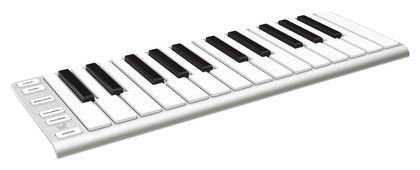
The ESI Xkey Air 25 keeps the appeal of an ultra-slim keyboard with full-size keys, now with USB-C for wired MIDI and charging. Bluetooth MIDI and its internal battery let you play without a cable to the computer. The exact ESI version is the current European listing used here; it is a different generation from the older CME micro-USB offer.
The 25 velocity-sensitive keys support polyphonic aftertouch, so pressure on individual notes can shape a compatible instrument. That is useful for held synth chords and expressive leads. The shallow key travel feels different from a conventional keyboard, so this is a portability choice rather than a piano-action replacement.
Its aluminum body and 388 x 135 x 16 mm dimensions make it easy to fit into a small setup. Pressure-sensitive buttons handle pitch bend and modulation, while octave and sustain buttons cover the basic performance controls. There are no drum pads or faders; use the nanoKEY Studio if hands-on beat and parameter control matter more.
Pros
- Full-size keys with polyphonic aftertouch
- Ultra-slim aluminum body
- Bluetooth MIDI and USB-C
Cons
- Short key travel takes adjustment
- No pads or faders
- Current verified buying option is European
The optional Xcable adapter adds five-pin MIDI output and connections for sustain and expression pedals. It is not included with the standard keyboard. A USB-C to USB-A cable is included for a wired setup. Check your device’s Bluetooth MIDI support before relying on wireless operation, and remember that the controller sends MIDI rather than the sound from your software instrument.
Specs: 25 full-size velocity-sensitive keys; polyphonic aftertouch; USB-C and Bluetooth MIDI; rechargeable internal battery; aluminum body; optional Xcable MIDI/pedal adapter.
Key Features and Specs to Consider in a Wireless Bluetooth MIDI Controller
When choosing the right Wireless Bluetooth MIDI Controller, it’s important to keep an eye out for certain features and specs if you want the ideal device. Compatibility, Quality, Controls, and Portability, among other things, are crucial when selecting the right controller.
Compatibility with devices and software
When choosing a wireless Bluetooth MIDI controller, it’s essential to consider compatibility with devices and software. Make sure the controller works well with your preferred operating system, such as Mac, PC, or mobile devices like iPads, iPhones, or Android tablets.
For instance, the CME Xkey Air 37 keyboard is compatible with various devices, including PC, iPad, Microsoft Surface Pro, Mac, and Android. The Korg microKEY Air 37, for example, offers compatibility with USB and connects wirelessly to iPad, iPhone, or Mac, and comes bundled with powerful music software for additional creative options.
Quality and range of Bluetooth connection
When it comes to choosing the best wireless Bluetooth MIDI controller, the quality and range of the Bluetooth connection play a crucial role in ensuring seamless integration with your devices and smooth performance.
The Korg microKEY Air 37 and nanoKEY Studio both support Bluetooth MIDI, but reliable use also depends on your computer or mobile device. Check operating-system support and any required drivers, then test the controller with your music app at the distance you expect to play.
Number of controls and features
When selecting a wireless Bluetooth MIDI controller, it’s important to consider the number of controls and features that each model offers. Different controllers cater to various musical needs, so it’s essential to find one tailored to your preferences.
For instance, the Korg microKEY Air-25 offers 25 velocity-sensitive keys, octave up/down buttons, a joystick, arpeggiator, and sustain button, a useful selection of features for portable music production. On the other hand, the Korg NANOKEY Studio provides a more comprehensive range of controllers, including 25 velocity-sensitive keys, assignable knobs, trigger pads, and a touchpad – making it suitable for both DAW control and DJ performance.
Portability and build quality
Portability and build quality are essential factors to consider when choosing a wireless Bluetooth MIDI controller. Lightweight, compact designs make it convenient for musicians on the go, but build quality should not be compromised.
For example, the Korg microKEY Air-25 is a lightweight, portable option with a solid build, making it suitable for producing music while traveling. The Korg microKEY Air 37 is another great example of a portable MIDI controller, offering a balance between size and build quality, ensuring durability without sacrificing the ease of transport.
Buyers Guide
Connecting Bluetooth MIDI Controllers to Devices
Bluetooth MIDI controllers can connect to a wide range of devices, such as phones, tablets, and computers. Compatibility varies depending on the operating systems like Windows, Macbooks, Android, and iOS. Bluetooth MIDI connections are usually made through your music app or the operating system’s MIDI utility. Follow the controller’s setup instructions, including any driver required for Windows.
Bluetooth vs. Wired MIDI Controllers
Bluetooth MIDI controllers offer increased flexibility and convenience by eliminating the need for cables. However, wired MIDI controllers tend to have less latency, making them more suitable for some live performance situations. Ultimately, the choice between Bluetooth and wired MIDI controllers depends on individual preferences and use cases.
Price Range and Budget Considerations
Wireless Bluetooth MIDI controllers are available in various price ranges, from entry-level options to high-end models. Be aware of your budget when deciding on a controller, considering factors such as desired features, controller quality, and software compatibility. Options like the Korg microKEY Air 37 provide a balance between affordability and functionality, while high-end controllers like the ESI Xkey Air 25 offer premium features and design aspects for a higher price.
FAQs
1. What are Wireless Bluetooth MIDI Controllers?
A wireless Bluetooth MIDI controller sends note and control messages to a compatible computer, mobile device, or MIDI receiver. It lets you play a software instrument or change parameters without a USB MIDI cable; it does not transmit the instrument’s audio. These controllers offer musicians and producers more flexibility and mobility when creating music.
2. Are all wireless Bluetooth MIDI controllers compatible with all devices and software?
No, not all controllers are universally compatible, so it’s important to check the manufacturer’s compatibility list to ensure it will work with your specific device and software.
3. What types of wireless Bluetooth MIDI controllers are available, and which one is right for me?
There are various types such as keyboards, drum pads, faders, and button controllers, each designed for different tasks. Choose the type that best suits your needs and budget.
4. What type of battery life can I expect from a wireless Bluetooth MIDI controller?
Battery life varies among controllers, but most devices are designed to last several hours with continuous use. The battery life will also depend on the type of batteries used and the frequency of use.
5. How is latency affected with a wireless Bluetooth MIDI controller, and is it a concern?
Wireless Bluetooth MIDI controllers can experience latency or a delay between the time you play a note and when it is heard, but the amount of latency will vary based on the device, software, and external factors such as distance and interference. Some controllers feature low-latency Bluetooth connections to reduce this issue, so it’s worth considering when making your purchase.
Conclusion
These 6 wireless Bluetooth MIDI controllers cover different jobs, from compact keyboard parts to drum programming and foot control. Choose the key size and controls you will use, then check compatibility with your device and music app.
My main recommended Bluetooth MIDI controller is the CME Xkey Air 37. It features velocity-sensitive keys with Polyphonic aftertouch that allow for realistic responsiveness. Additionally, it’s widely compatible and adds up to a well-rounded and highly-popular choice.
My second recommended Bluetooth MIDI controller is the Korg microKEY Air-25. This is an extremely portable and affordable entry. It comes with 25 mini keys, a joystick, and Bluetooth or USB connectivity.