The 6 Best Podcasting Headphones (2026)

Wired, closed-back headphones help podcast hosts and guests monitor speech while recording. These six pairs compare cable replacement, fit, folding designs, and isolation, whether you need one regular host pair or several sets for guest stations.
My top pick is the RØDE NTH-100 for its detachable cable connection on either earcup and FitLok adjustment for a regular host.
My budget pick is the Shure SRH440A, a lower-cost closed-back pair with a detachable straight cable for a straightforward recording setup.
Contents
The Best Podcasting Headphones (2026)
1. RØDE NTH-100
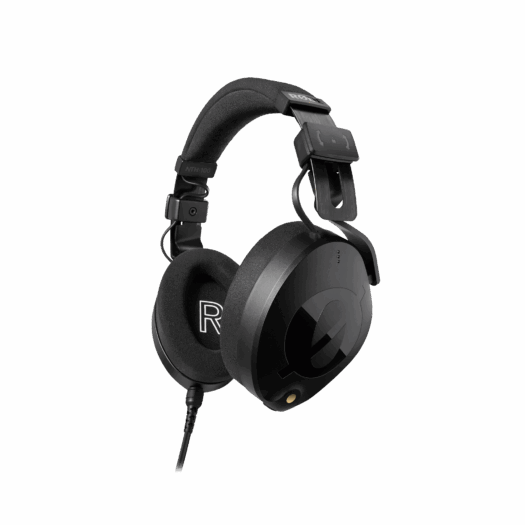
The RØDE NTH-100 is my first recommendation for a host who records regularly at the same desk. Its cable can connect to either earcup, which helps keep the lead away from your microphone arm, computer mouse, or the side where a guest is seated.
Pros
- Cable connects to either earcup
- Removable locking cable and FitLok headband adjustment
Cons
- Only a carry pouch is included, without a hard case
The removable locking cable is useful in a setup that gets packed away between episodes. FitLok locks the headband adjustment after you set it, while the Alcantara cushions and CoolTech gel are designed around longer listening sessions. Fit still depends on the person, so try them with your glasses if you normally wear them.
For a spoken-word session, use the cable-routing choice to keep movement quiet and prevent the lead from rubbing against the microphone stand. Set the monitor level before recording rather than turning it up to compensate for a poorly balanced headphone mix.
Choose the NTH-100 for those physical workflow features. It is a pair of headphones, not the NTH-100M headset: a microphone is not included with the standard model. If guests frequently borrow your headphones, remember that the locked headband will need readjustment for each person.

2. Shure SRH440A
The Shure SRH440A is worth considering for a podcast desk where a detachable straight cable is preferable to a coiled lead. It has a closed-back, over-ear construction and a padded headband, with a threaded quarter-inch adapter included.
Pros
- Detachable straight cable
- Simple wired connection with threaded adapter
Cons
- The 3m straight cable leaves excess lead at a small desk
A straight lead can be routed along the back of a table and secured away from hands, paper, and microphone mounts. Leave enough slack for the guest to turn naturally, because a tightly restrained cable can tug on the headphones or transmit movement into the desk.
Its value for spoken-word work is the straightforward wired connection. There is no battery or wireless pairing process to explain to a guest. Before an interview, check that the adapter is firmly fitted and that the headphone mix includes the remote caller if one is joining.
Make sure the product is SRH440A rather than assuming an older SRH440 listing has identical construction and accessories. Choose it for an uncomplicated wired station with a removable cable. As with every model here, a comfort check is more useful than assuming the headband will suit every guest equally well.

3. Sony MDR-7506
The Sony MDR-7506 is a practical choice for a small interview kit. Its closed-ear design and folding construction make it easy to keep a wired monitor pair alongside a recorder, microphone, and spare cables.
Pros
- Folding construction for a location kit
- Wired monitoring without charging
Cons
- Fixed coiled cable is less convenient to replace
For podcasting, the useful job is hearing the recorded signal clearly enough to catch a loose connector, mouth noise, or a change in microphone distance. The headphones do not remove those problems; they give the host an opportunity to notice and correct them before the guest leaves.
The coiled cable gives room to move around a desk, but it is fixed to the headphones. Route it so its weight is supported rather than hanging from the earcup, and keep spare adapters in the kit. A damaged cable is less convenient to replace than the detachable leads on several alternatives here.
Choose the MDR-7506 when folding portability matters more than a modular cable system. For a fixed multi-person studio, the M40x or SRH440A is worth comparing if replaceable leads are a priority. These are wired monitoring headphones, so they do not need charging before an interview.
4. Audio-Technica ATH-M40x
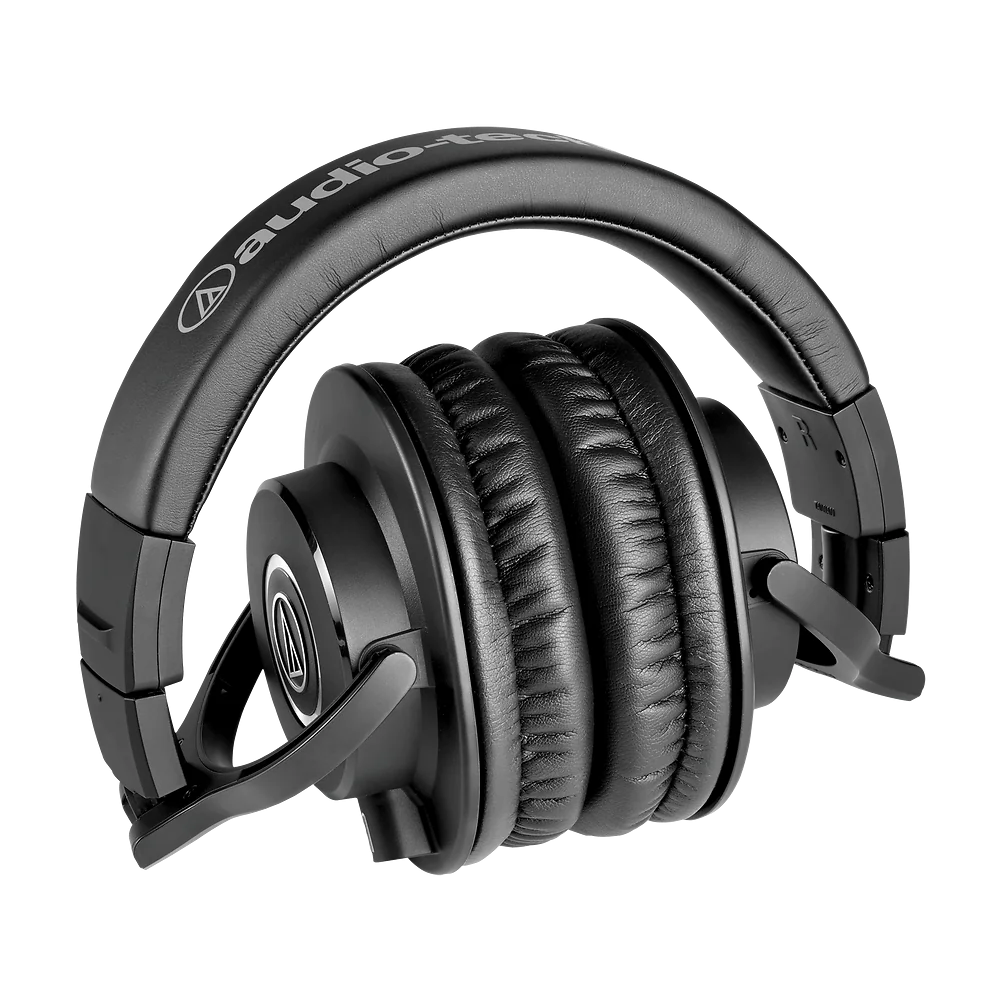
The Audio-Technica ATH-M40x is a useful option for guest headphones because the detachable cable gives you flexibility at the table. The package includes straight and coiled cables, so you can choose the arrangement that creates less clutter around each seat.
Pros
- Detachable straight and coiled cables included
- Folding design for storage between sessions
Cons
- Replacement cables need the correct locking connector
It is a closed-back model with swiveling earcups and a folding design. That makes it practical when a room has to return to another use after recording. Keep the detachable cable with the headphones when packing away so the next session does not begin with a search for the correct lead.
For a guest who is unfamiliar with monitoring, explain that they should hear both the other speakers and their own microphone. Adjust their headphone level separately if possible. Buying the same model for several seats simplifies the setup, but each listener may still prefer a different volume.
The M40x is the model discussed here, not the M50x or a wireless M-Series variant. Its cable connector is model-specific, so a random audio lead should not be assumed to fit. Choose it for a straightforward, serviceable guest-monitoring setup rather than paying for features that only matter during music mixing.

5. beyerdynamic DT 700 PRO X
The beyerdynamic DT 700 PRO X is the step-up choice for someone who records the conversation and also spends substantial time editing it. Its closed design suits microphone monitoring, while the detachable mini-XLR cable makes a worn lead easier to replace.
Pros
- Detachable mini-XLR cable
- Replaceable pads and headband components
Cons
- Larger design is less convenient for travel
The 48-ohm STELLAR.45 driver is intended for use across different playback devices. That is more convenient for a host moving between a recorder and a desktop interface than choosing a high-impedance model without checking the available headphone output. Still test the actual output level and noise of your setup.
Replaceable pads and headband components are useful when one pair becomes a daily work tool. During editing, listen for transitions between speech takes, intrusive breaths, and changes in room tone. Those are more relevant to a podcast than judging a pair by the extremes of its advertised frequency range.
Choose the DT 700 PRO X when the main host and editor will use it consistently. It is a larger studio design, so a folding pair may be easier for travel. Do not confuse it with the DT 770 PRO or the open DT 900 PRO X; the construction and buying considerations differ.

6. Sennheiser HD 280 PRO
The Sennheiser HD 280 PRO is the option to consider when passive isolation is a priority in a shared room. Its closed construction is intended for monitoring, with a folding design that helps when headphones have to be stored between sessions.
Pros
- Closed monitoring with passive isolation
- Folding design for storage
Cons
- Fixed cable is harder to replace than a detachable lead
The coiled cable can extend around a desk without leaving the whole lead spread across it. Its 64-ohm impedance is a specification to check alongside the headphone output, not a promise that every recorder will drive it identically. Try it at a sensible listening level before buying several pairs.
A secure seal helps keep the monitored conversation in your ears and reduces distraction from the room. It cannot make a noisy recording space silent or stop the microphone hearing a fan. Position the microphone and deal with room noise separately instead of using more headphone level to cover it.
Choose HD 280 PRO for closed monitoring and a compact stored form. The cable is not a quick detachable arrangement like the M40x or DT 700 PRO X. Check the physical fit during a longer trial, especially if the headphones will be handed to guests with different head sizes or glasses.
How to Choose Headphones for Podcasting
Prioritize the Monitoring Connection
Connect headphones to the device handling your recording or monitor mix. That might be an interface, podcast mixer, recorder, or the headphone socket on a USB microphone. Headphones alone cannot make a delayed software monitor feed immediate; use direct monitoring where the recording device provides it.
Bluetooth can be convenient for listening to a finished episode, but its extra delay complicates monitoring your own live voice. A wired connection also avoids pairing and charging during a guest session. Check whether you need a 3.5mm plug or a quarter-inch adapter before the guest arrives.
Keep the Headphone Sound Out of the Microphone
A closed-back pair is a sensible starting point for recording around microphones. It reduces outward leakage compared with an open design, but high listening levels can still spill into a microphone. Use the lowest comfortable monitor level and make a short test recording with everyone seated.
Ask guests to keep both earcups properly positioned where possible. If someone removes one side to feel more natural, make sure the exposed cup is not facing a nearby microphone at a high volume. Microphone position and a comfortable monitor balance often help more than simply asking the guest to speak louder.
Plan for Several Listeners
Each speaker needs a feed they can hear comfortably. Several headphone sockets on a podcast mixer may provide separate volume controls; a small interface may require a headphone distribution amplifier. A passive splitter is not the same as independently controlled headphone outputs.
Use labels or cable colors to identify seats, keep spare adapters nearby, and check every feed before recording. A guest needs clear speech and the remote participant, if present. They do not necessarily need the same music level or loudness as the person operating the recording.
Choose Comfort and Maintenance for the Real Session
An interview can last much longer than the opening soundcheck. Try the headphones with your usual glasses, and check whether the headband and cushions remain comfortable after more than a few minutes. Manufacturer claims cannot decide that for every listener.
For shared pairs, follow the maker’s cleaning guidance and check replacement-pad availability. Removable cables are useful when a lead wears out, but proprietary connectors still require the correct replacement. If music mixing is your main task, see our broader studio headphone guide for that different use.
Frequently Asked Questions
Do Podcast Headphones Need a Microphone?
No, if you already record through a separate microphone. The headphones let you monitor the signal; they do not have to capture it. A headset is a different option for situations where its microphone and connection fit the recording system, so do not assume standard headphones include a mic.
Can I Record a Podcast Without Headphones?
You can, but monitoring helps reveal problems while there is still time to fix them. It also allows remote participants to be heard without playing their audio through speakers beside an open microphone. Make a brief recording and listen back even when the live feed seems fine.
Does Every Guest Need the Same Model?
No. What matters is that each person can hear the conversation comfortably and that leakage is controlled. Matching models make storage, spares, and replacement pads easier, but do not force everyone to share one volume setting. Confirm the actual headphone mix at every seat.
Are Noise-Cancelling Headphones Necessary?
No. The models here rely on closed construction and passive isolation. Active noise cancellation is not required for a quiet recording room, and it does not remove noise from the microphone recording. Improve the room and microphone placement when background noise is the problem.
Summary
Choose NTH-100 for cable-routing flexibility at a host desk, M40x for interchangeable guest-station leads, or MDR-7506 for a folding location kit. DT 700 PRO X suits a regular host and editor, while SRH440A and HD 280 PRO cover straightforward closed monitoring. Check the headphone feed, physical fit, and leakage before the full conversation begins.