The 7 Best Beat Machines For Hip Hop (2026)
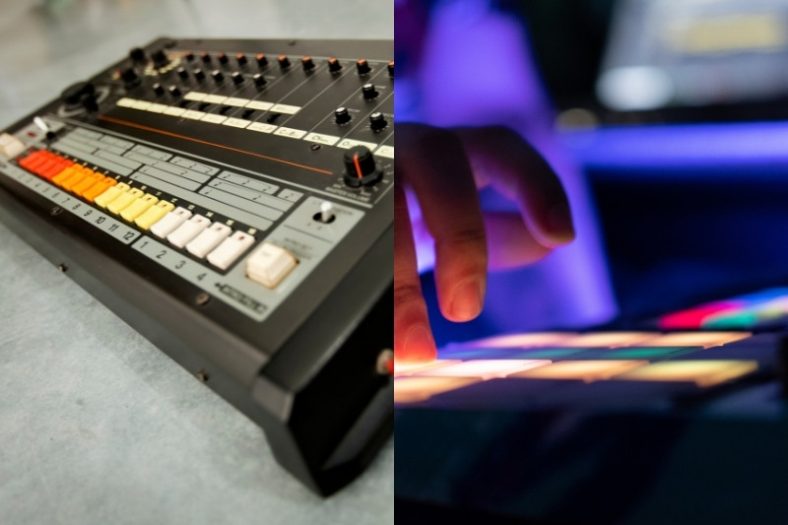
Hip-hop and beat machines are like bread and butter, as beats and loops are core elements for the genre. You can basically create a beat and a loop and start rapping immediately with a beat machine.
Today, there are hundreds of different beat machine models to choose from. So, you will have to consider various factors if you want to buy one that would ease the process of creating and realizing your ideas.
My top pick is the Akai Professional MPC One G2, as it combines sample chopping, expressive pads, and full-song arrangement without a laptop.
My budget pick is the Korg Volca Beats, which is an easy-to-use analog beat machine designed to be affordable, portable, and light.
Contents
- The 7 Best Beat Machines For Hip Hop (2026)
- 1. Akai Professional MPC One G2
- 2. Korg Volca Beats Analog Drum Machine
- 3. Roland TR-08 Rhythm Composer
- 4. Arturia DrumBrute Impact
- 5. Native Instruments Maschine MK3
- 6. Alesis SR-18
- 7. Roland P-6 Creative Sampler
- What is a Beat Machine?
- What features to look out for in a Beat Machine?
- Are beat machines beginner-friendly?
- How does a beat machine sound compared to real drums?
- Verdict
The 7 Best Beat Machines For Hip Hop (2026)


Let’s compare them in more detail.
1. Akai Professional MPC One G2
The Akai Professional MPC One G2 is a standalone sampler and sequencer for building hip-hop tracks without a laptop. You can chop a recorded phrase, play your drums on 16 velocity- and pressure-sensitive pads, add bass or keys, and arrange the parts into a complete song. Its seven-inch touchscreen gives you room to edit those parts without relying entirely on button combinations.
Pros
- Standalone sampling and song arrangement
- Expressive pads with eight pad banks
- MIDI and CV/gate connections for external gear
- Touchscreen editing
Cons
- Needs mains power
- A deeper workflow to learn than a basic drum machine
The G2 combines an eight-core processor, 4GB of RAM, and 64GB of internal storage. That extra capacity is useful when your project grows beyond a simple drum loop. MPC3 adds a track-based workflow and a linear arranger, while the physical Q-Link knobs let you adjust parameters alongside the screen.
For sample-based hip-hop, the appeal is having the recording, chopping, sequencing, and arrangement stages in one box. The line inputs accept external audio, and USB-C also provides audio and MIDI connectivity. MIDI and CV/gate outputs make it useful as the centre of a setup that includes hardware synthesizers.
It is still a desktop instrument: there is no built-in battery. The 4-by-4 pad layout also serves a different purpose from a large clip-launching grid. If you want a portable sampler with speakers and a rechargeable battery, the MPC Live III is worth considering, but the One G2 keeps this recommendation focused on a smaller studio setup.
| Sound Synthesis | Digital sampling and instruments |
| Pads | 16 velocity- and pressure-sensitive RGB pads |
| Display | 7-inch touchscreen |
| Battery Power | No |
The MPC One G2 is my top pick for producers who want to turn samples, drums, and melodic parts into finished tracks on standalone hardware. Plan to spend some time learning the workflow; that is what gives it more room to grow than a basic rhythm box.
2. Korg Volca Beats Analog Drum Machine
The Korg Volca Beats is an affordable analog drum machine designed to provide the basics of a beat machine. It is equipped with 6 analog parts and 4 PCM parts, as well as a 16-step sequencer with 8 memory patches.
Pros
- High value-price ratio, affordable
- Easy-to-play
- Great sounds for hip-hop
Cons
- Does not have the sound variety of higher-end machines on this list
It is a highly easy-to-use beat machine without many features. It features 6 fully editable analog sounds and also has a decent built-in speaker to play music anywhere you’d like. Plus, it is a compact and portable device.
The main limitation is its fixed set of ten drum parts. You cannot load your own samples, so it offers less variety than a sampling-based beat machine. Its analog sounds remain useful for simple grooves, especially when portability and a direct workflow matter more than a large sound library.
| Sound Synthesis | Analog |
| Pads | 16 keys |
| Display | LED display |
| Battery Power | Yes |
The Volca Beats is a great entry-level portable beat machine for musicians who want the essential features in an analog spirit without breaking the bank.

3. Roland TR-08 Rhythm Composer
The Roland 808 is the most iconic analog drum machine in hip-hop history. It was used by many artists for many famous songs and eventually became a legend among artists. That is why many devices were inspired by the legend. As one of those devices, the TR-08 Rhythm Composer is the modernized version of 808 with a more affordable price and some digital integrations.
Pros
- A modernized version of the iconic 808
- Multi-channel USB audio
- Authentic sounds and design
- 10 audio channels over USB
Cons
- It takes a bit of getting used to!
The TR-08 can also be used as a standalone beat machine. It features a 16-step sequencer, LED display, battery or USB power supply options, a decent built-in speaker, 10 separate audio channels over USB, and a vintage analog design. But the best of all is that all these features come at an affordable price.
The letdown of the device is that it is not an easy beat machine to use. You will have to get familiar with the workflow and explore all the features the machine has. I must say that also it takes longer to set up this beat machine compared to other devices.
| Sound Synthesis | Digital |
| Pads | 16 |
| Display | LED display |
| Battery Power | Yes |
Overall, if you are a hip-hop enthusiast who likes vintage devices, the TR-08 is ideal for you. The 808 follower is affordable, matches the sonic quality of its ancestor, and the modernized digital additions are great.

4. Arturia DrumBrute Impact
The Arturia DrumBrute Impact is an analog drum machine with hands-on sound controls and flexible sequencing options. It features a 64-step sequencer, 10 instruments with 8 touch-sensitive pads, and a wide range of control options. Its ten sounds and sequencer suit producers who want to shape a drum groove directly, rather than record or load their own samples.
Pros
- Flexible sequencer
- Great low-end sounds
- Intuitive user interface
- Rich connectivity options
- Built-in output distortion and per-instrument Color controls
Cons
- Do not have as many sounds as digital machines
- Outputs are mini-jacks
Even if you haven’t used any drum machine before, you can quickly get familiar with the DrumBrute Impact sequencing workflow thanks to its intuitive user interface. The sequencer consists of 4 banks of 16 patterns lasting up to 4 bars each.
Another feature that stands out is the direct control over the DrumBrute Impact’s sounds. The Color function changes individual voices, and its output distortion adds drive to the combined mix. There is a ¼-inch main output plus four 3.5mm individual outputs for the kick, snare, hi-hats, and FM drum. MIDI input/output, USB MIDI, and clock connections let you synchronize it with other instruments.
| Sound Synthesis | Analog |
| Pads | 8 velocity-sensitive pads |
| Display | LED display |
| Battery Power | No |
As you would guess, the DrumBrute does not have as many sound options as a digital unit. Also, I would prefer standard jacks instead of mini jacks as outputs. However, the DrumBrute Impact remains a useful choice for hands-on analog sequencing and live pattern changes.

5. Native Instruments Maschine MK3
The Native Instruments Maschine MK3 is an all-around music production machine with which you can easily record, sample, mix, integrate, and sequence your songs. It features a nice balance between physical tools with digital sounds, using both parts with maximum efficiency.
Pros
- Physical and digital tool
- Big touch-sensitive pads
- Wide range of sonic possibilities
Cons
- The workflow is not for everyone
The MK3 is a hardware controller and audio interface for Maschine software running on a computer. It does not play its sounds independently. That is an important difference from the standalone MPC One G2 and from Native Instruments’ Maschine+, which is a separate model.
The large touch-sensitive pads are quite fun to play with, as they are really responsive to changes in dynamics. Plus, it has a high sound quality with a 24bit/96KHz audio interface. Furthermore, it comes with the Komplete Select software. The pads and screens let you work hands-on, while the connected computer runs the instruments and effects.
| Sound Synthesis | Digital |
| Pads | 16 touch-sensitive pads |
| Display | Yes |
| Battery Power | No |
The only letdown is that it may take some time for some users to get familiar with the workflow. It is not hard, but you have to get used to it. In short, if you are looking for an all-in-one audio sampler and a controller capable of doing anything, the Native Instruments Maschine MK3 is the ideal choice.

6. Alesis SR-18
The Alesis SR-18 is an inexpensive drum machine from a renowned manufacturer of electronic drums. This portable beat maker is a standalone device that can be powered by either a battery or an AC adapter so you can make beats on the go if needed.
Pros
- Affordable beat maker
- Good sound set with a percussion bank and bass synth
- Useful built-in effects
- AC adapter and battery-powered
Cons
- The pads are a little jammed together
- Slightly outdated controls
The SR-18 is a great entry-level drum machine that features a 32MB sound set with different kinds of sounds. It comes with 175 preset patterns, 100 user patterns, 32-voice polyphony, and all necessary effects such as reverb, EQ, and compression.
The infamous Pattern Play Mode is incredibly useful if you want to trigger patterns from the pads directly. The backlit LCD display is fairly simplistic but large enough to make out what you’re doing and navigate the 500 drum and 50 bass sounds.
| Sound Synthesis | Digital sample playback |
| Pads | 12 velocity-sensitive pads |
| Display | Backlit LCD |
| Battery Power | Yes |
The bottom line is that the SR-18 is a quality, slightly outdated, but excellent drum machine for beat-making if you want something affordable yet feature-packed.
7. Roland P-6 Creative Sampler
The Roland P-6 Creative Sampler is a compact choice for hip-hop producers who want to record and chop their own sounds while travelling. Its built-in microphone, line input, and USB-C connection provide several ways to capture material. You can then sequence drum hits and short musical phrases without connecting a laptop.
Pros
- Sampling through the built-in microphone, line input, or USB-C
- Rechargeable battery for portable sessions
- Sample chopping and hands-on effects
- 64-step sequencer with micro-timing
Cons
- Short recording time per sample
- Small display and several button combinations to learn
The P-6 stores 48 samples and 64 patterns. Its six sample pads work with banks, while the keyboard buttons let you play a sound at different pitches. This makes it useful for assembling a beat from your own drum sounds and snippets, rather than choosing only from a fixed set of drum voices.
There is plenty to shape a short phrase: sample chopping, resampling, lo-fi processing, delay, and reverb all suit beat-making. A separate granular mode can turn tiny pieces of a recording into sustained or changing textures. The sequencer adds probability, sub-steps, and micro-timing when you want movement or a less rigid groove.
The main limitation is sample length. At 44.1kHz, each mono sample can run for up to 5.9 seconds, and stereo halves that time. Lower sample rates extend it, with a change in fidelity. That suits drum hits and short chops much better than long backing tracks. Roland rates the rechargeable battery for approximately three hours, depending on use.
| Sound Synthesis | Digital sampling and granular processing |
| Sample Pads | 6, with sample banks |
| Display | 4-character LED |
| Battery Power | Yes, rechargeable |
Choose the P-6 if compact size and recording your own sounds matter more than a large screen or a full-song workstation. It is a useful partner for a drum machine, as well as a small beat-making setup in its own right.
What is a Beat Machine?
Beat Machines are mostly box-shaped electronic devices with many different drum sounds used to create beats and grooves. There are 2 different devices you can use as a Beat Machine: samplers and drum machines.
Drum machines are electronic devices used to create beats and grooves with drum and percussion sounds by physically pressing touch-sensitive pads. They also feature a built-in sequencer to develop songs.
On the other side, samplers are electronic devices used for recording, customizing, and playing back digital audio. They feature digital samples of real instruments, parts of songs, or sound effects that you can assign to pads and start playing.
If your aim is to create simple drum grooves, you can go with a drum machine. However, if you want to create multi-instrument loops, you will have to go for an MPC-style sampler.
What features to look out for in a Beat Machine?
Before everything, you need to decide what type of Beat Machine you want. You can go with an analog or digital one, a small or a big one. Although, in my opinion, digital machines are more versatile and replicate the real drum sounds better, some musicians think analog ones sound warmer.
The key features you have to look for in a Beat Machine are touch-sensitive pads, built-in effects, and programming and editing features.
Touch-sensitive pads are crucial as you assign a percussive sound to each one of them and create your groove by playing the sounds with those pads. In order to create a more realistic sound, the pads should have good dynamic responses so they can reflect the nuances of your playing clearly.
Built-in effects are also important to elevate the versatility of sounds and your control over them. You need at least some of the effects like modulation, delay, compression, gain, enhanced tuning, and panning to keep things interesting.
Finally, you should look out for programming and editing features. These are the features used to record a sound and mix them with the drum machine’s presets.
Are beat machines beginner-friendly?
Most of the Beat Machines are easy to play, but you need some time to get familiar with each one’s workflows. All the brands have different workflows but do not worry about it as you can get used to them pretty quickly.
How does a beat machine sound compared to real drums?
Beat machines use either drum synthesis or actual drum samples, which are single-note recordings of real drum parts like snares, kicks, toms, and cymbals. Although some musicians, especially drummers, do not like the sample sounds, beat machines produce quite realistic sounds nowadays. However, they’re never a full replacement for live drums.
Verdict
Whether you use them in the studio for recordings or live performances in different settings, beat machines are great music production tools for entry-level musicians as well as pro producers. It is the essential piece you will need for many genres like hip-hop or dance music. So, you can go for any of these pick-up-and-play boxes or fully-featured, all-in-one production tools without hesitation.
My top recommendation is the Akai Professional MPC One G2, as it brings sampling, drum programming, and song arrangement together in one standalone unit.
My second recommendation is the Korg Volca Beats, a great choice for tight budgets as it is affordable and has all the essentials to get you going.